Microsoft’s Windows Production PCA 2011 certificate, which signs the Windows boot manager, expires on 19 October 2026. Machines keep booting, but any still trusting only the 2011 certificates stop getting new boot-level fixes. Check every Windows PC and Secure Boot VM for “Windows UEFI CA 2023” with the PowerShell line below; if it is missing, update Windows and firmware.
Last updated 16 October 2026. Every command here comes from Microsoft, Red Hat, AlmaLinux, Proxmox or Broadcom documentation, linked in the text and listed at the end.
What changed
Secure Boot works because the firmware holds a short list of trusted Microsoft certificates. Three of them date from 2011 and all expire this year. Microsoft’s certificate expiration page gives the dates: the Microsoft Corporation KEK CA 2011 expired on 24 June, the Microsoft UEFI CA 2011 (which signs third-party boot loaders such as the Linux shim, and option ROMs) on 27 June, and the Microsoft Windows Production PCA 2011 expires on 19 October. Each has a 2023 replacement that has to be written into the firmware’s KEK and DB stores.
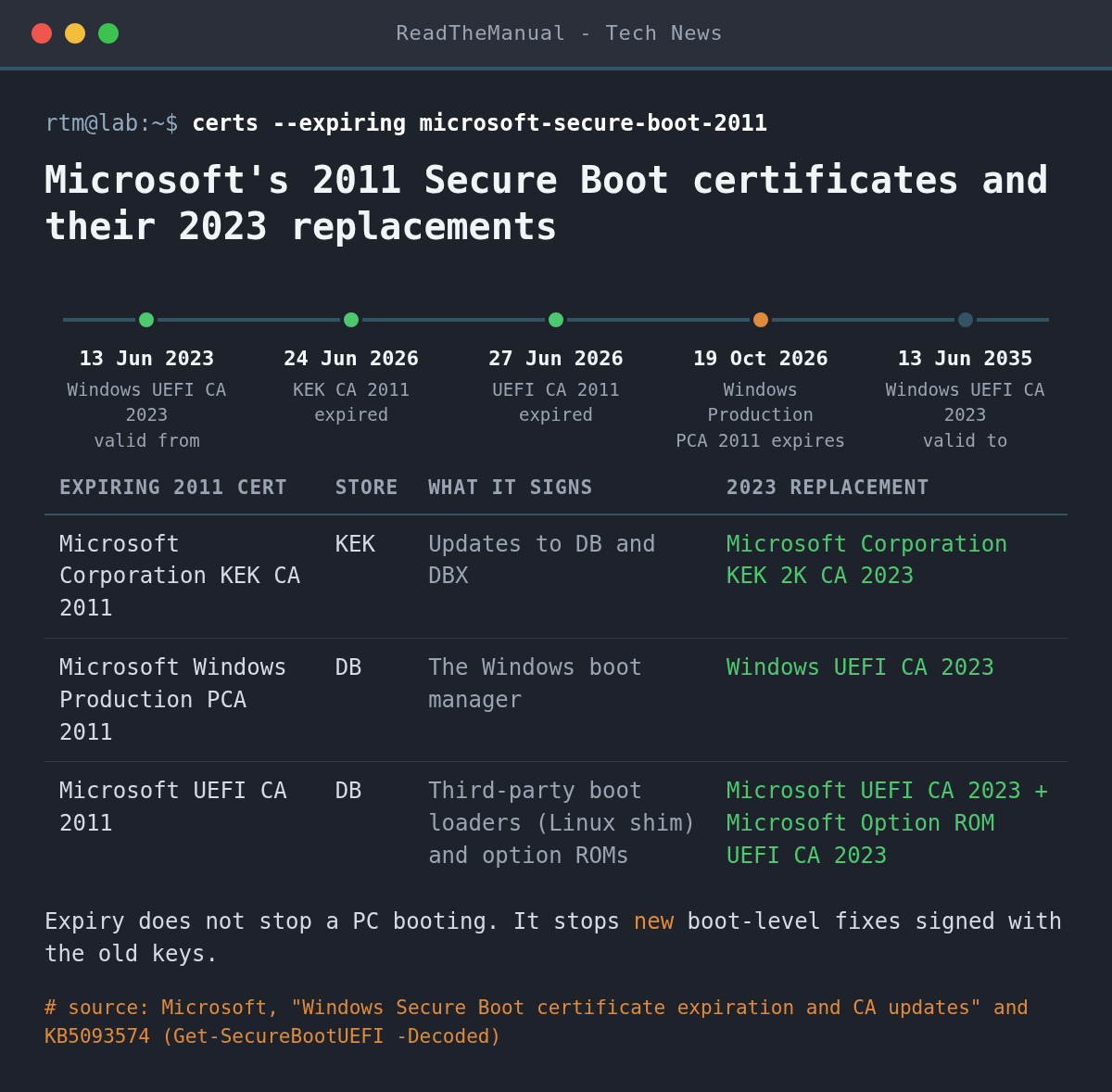
What actually happens on the day is less dramatic than some headlines suggest. In Microsoft’s words, devices without the 2023 certificates “will continue to start and operate normally” and “standard Windows updates will continue to install”, but they “will no longer be able to receive new security protections for the early boot process”. Because PCA 2011 signs the Windows boot manager, a machine that only trusts it cannot take a boot manager signed with the new Windows UEFI CA 2023. Because the old KEK signs updates to the DB and the DBX (the revocation list), a machine without the 2023 KEK cannot take future revocations either. The October 2026 cumulative update notes say the same, and that Microsoft is still pushing the 2023 certificates through Windows Update to devices it rates as safe to update.
If you have seen “Secure Boot certificate updates are temporarily paused”, that is a status message in the Windows Security app, not a global pause. Microsoft’s Windows Security app guidance says it appears when a device matches a known issue, and that updates resume on their own once it is resolved.
What it means for your homelab
Anything with Secure Boot switched off is not affected by these dates. Anything with it on needs a look, and a homelab tends to have more of those than you think:
- Windows PCs and laptops. Most will be updated by Windows Update, but some need a firmware update from the manufacturer first.
- Windows VMs with UEFI and Secure Boot. A VM’s certificates live in its virtual firmware (the EFI disk on Proxmox, the NVRAM file on ESXi), which was written when the VM was created. Windows inside the guest cannot always fix that on its own, so the hypervisor side comes first.
- Linux, including dual boot. The shim that starts most distributions under Secure Boot is signed by Microsoft’s third-party CA. Red Hat says existing systems keep booting, that “after June 2026, new versions of shim will only be signed by the 2023 key”, and that you should not remove the 2011 certificate after adding the 2023 one.
How do I check Secure Boot certificates in PowerShell?
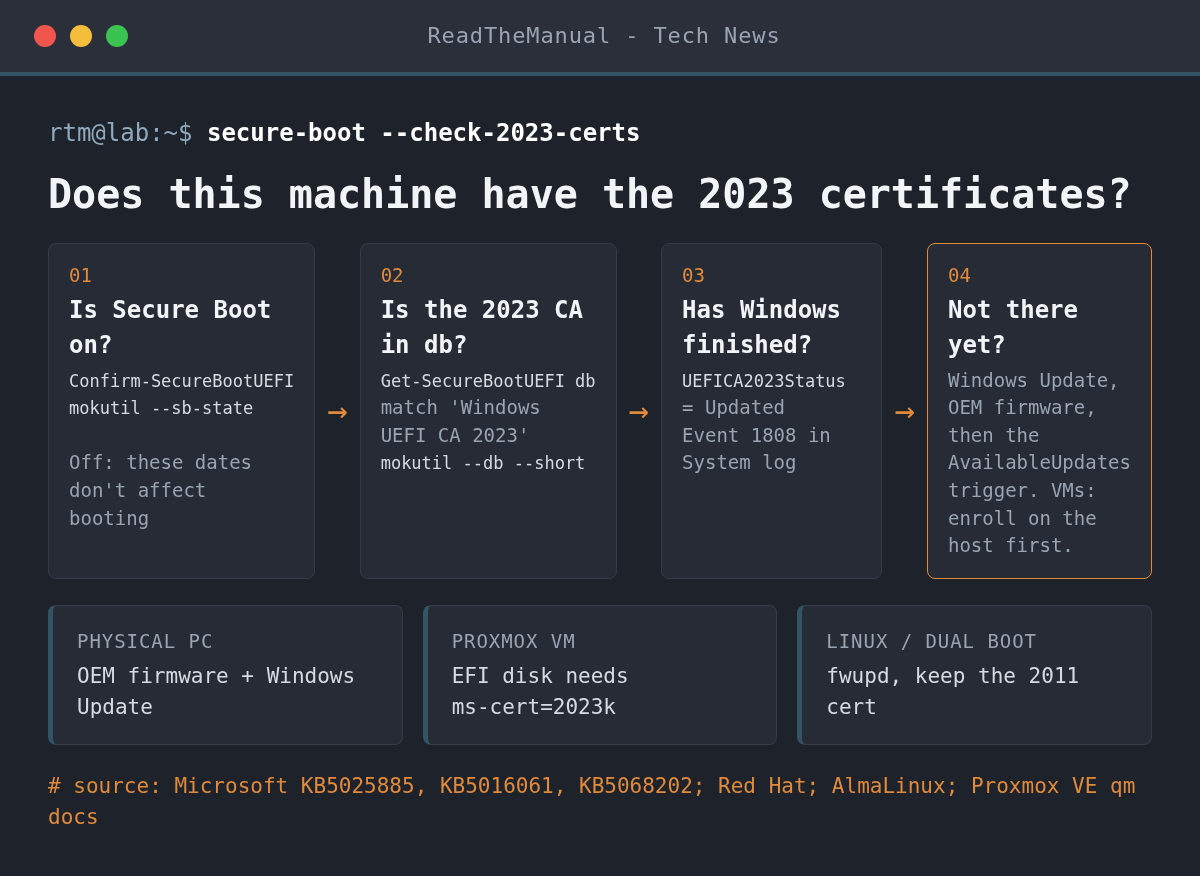
The quickest view needs no commands: open Windows Security, then Device security, then Secure Boot. On an up-to-date device Microsoft says it shows “Secure Boot is on and all required certificate updates have been applied”. For a definite answer, open PowerShell as Administrator. First confirm Secure Boot is on (Confirm-SecureBootUEFI returns True), then run the db check from Microsoft’s KB5025885. It should also return True:
Confirm-SecureBootUEFI

[System.Text.Encoding]::ASCII.GetString((Get-SecureBootUEFI db).bytes) -match 'Windows UEFI CA 2023'
The same KB checks whether Windows has finished the job, certificates and the 2023-signed boot manager together. The answer you want is Updated; NotStarted or InProgress means it has not:
(Get-ItemProperty -Path "HKLM:\SYSTEM\CurrentControlSet\Control\SecureBoot\Servicing").UEFICA2023StatusOn machines with the April 2026 cumulative update or later, Get-SecureBootUEFI -Name db -Decoded lists each certificate by name with its validity dates (KB5093574). Windows also logs progress to the System event log under the TPM-WMI source (KB5016061). Event 1808 means the device has the new certificates and boot manager. Event 1801 means the certificates are updated in Windows but not yet applied to the firmware. Events 1795, 1802 and 1803 point at the firmware, and the fix is usually a BIOS or UEFI update from the manufacturer. To see the latest of them:
Get-WinEvent -FilterHashtable @{LogName='System'; Id=1801,1808,1795,1802,1803} -MaxEvents 5How do I install the 2023 certificates on Windows?
Start with the boring route: install the latest cumulative update and check the manufacturer’s support page for a BIOS or UEFI update. Most home PCs will then pick up the certificates on their own. If you manage your own updates and want to push it now, Microsoft’s registry key guidance (KB5068202) documents a trigger. The value 0x5944 deploys the 2023 certificates, updates the KEK and installs the boot manager signed by the 2023 CA. From an elevated prompt:
reg add HKEY_LOCAL_MACHINE\SYSTEM\CurrentControlSet\Control\Secureboot /v AvailableUpdates /t REG_DWORD /d 0x5944 /f
Start-ScheduledTask -TaskName "\Microsoft\Windows\PI\Secure-Boot-Update"
The task normally runs every 12 hours. Microsoft says to restart once AvailableUpdates reaches 0x4100, then run the task again after the restart, and to check UEFICA2023Status afterwards. Before you touch Secure Boot variables on a machine with BitLocker, have its recovery key to hand: changing the db changes the measurements BitLocker relies on (Red Hat notes PCR7 changes after a db update, and Microsoft logs event 1032 when it holds an update back for that reason).
What about Windows VMs on Proxmox, Hyper-V and VMware?
Proxmox VE. The qm documentation has a section on this. An EFI disk with only the 2011 certificates rejects boot loaders signed with the 2023 ones. EFI disks created with pve-edk2-firmware 4.2025.05-1 or later already contain both sets and carry an ms-cert=2023k marker; older ones need the certificates enrolled. Check the marker from the host shell:
qm config <vmid> | grep efidiskNo marker, or ms-cert=2023 or ms-cert=2023w (which Proxmox says may mean partial enrolment), means enrol. For a Windows guest with BitLocker, suspend the protectors inside the VM first, otherwise it will ask for the recovery key on the next boot. Then, in the web UI, select the EFI disk under Hardware and use Disk Action, Enroll Updated Certificates, which applies at the next start. The CLI does the same with the VM shut down:
# inside the Windows guest, per BitLocker drive
manage-bde -protectors -disable C:

# on the Proxmox host, VM shut down
qm enroll-efi-keys <vmid>
Proxmox VE 9.2 added the web UI option, included the Windows UEFI CA 2023 and KEK 2023 in the enrolment, and now warns at VM start when an EFI disk with pre-enrolled keys is missing them (release notes). If your hosts are older, update them before you enrol. Enrolment only fixes the virtual firmware: inside the guest, the Windows steps above still apply, and once UEFICA2023Status shows Updated, turn BitLocker back on with manage-bde -protectors -enable C:. If your Proxmox install is still on 8.x, our Proxmox VE 8 to 9 upgrade guide covers the jump.
Hyper-V. Microsoft’s known issues page lists KEK updates failing with event 1795 (“media is write protected”) on Hyper-V VMs. It is fixed in updates from 10 March 2026 (14 April for Windows Server 2025), and the fix has to be installed on both the host and the guest.
VMware ESXi. Broadcom’s KB 423893 says VMs created on hosts older than ESXi 8.0 U2 can be missing the 2023 KEK, and VMs created before ESXi 9.0 often have a placeholder Platform Key that blocks KEK updates altogether. ESXi 8.0 U3j and ESX 9.1.1.0 automate a fix for VMs without a vTPM, and 9.1.1.0 also handles Windows VMs with a vTPM; other cases still use the manual steps in that KB. KB 421593 covers regenerating a VM’s NVRAM file to pick up the new KEK.
How do I check Secure Boot certificates on Linux?
Linux needs less urgency. Red Hat says “as long as either of the Microsoft certificates is present in the firmware db, the machine will boot”, and current shims from Red Hat and AlmaLinux on x86_64 are signed with both the 2011 and 2023 CAs. The check matters for the future, when shims are signed with the 2023 key only. From Red Hat’s guidance:
mokutil --sb-state
mokutil --db --short
You want SecureBoot enabled, and in the db list Microsoft UEFI CA 2023 (third-party loaders such as shim) alongside the 2011 entries. On a dual-boot machine you should also see Windows UEFI CA 2023 once Windows has done its update. AlmaLinux adds a KEK check, mokutil --kek | grep 'KEK 2K CA 2023', and if either comes back empty, its guide applies the update through fwupd (installed with dnf on AlmaLinux 9 and 10), then reboots and checks again:
sudo fwupdmgr refresh
sudo fwupdmgr update
sudo reboot
Whichever route adds the 2023 certificates, leave the 2011 ones in place. Red Hat is explicit about that, and removing them can stop older shims and boot media from starting.
Career Context: Expect tickets this week from people who read “certificate expires” and assume their PC will stop booting. Being able to say calmly what does and doesn’t change, run the one-line db check and read events 1801 and 1808 is exactly the support skill that gets noticed. If you are heading for a sysadmin or security role, learn the chain behind it too: the Platform Key signs the KEK, the KEK signs changes to the db and dbx, and the db decides which boot loaders run. That chain explains every symptom in this post, including why a VM with a placeholder Platform Key can’t take a new KEK.
Sources
- Windows Secure Boot certificate expiration and CA updates (Microsoft Support, expiry dates and impact)
- KB5025885: managing the Windows Boot Manager revocations for CVE-2023-24932 (Microsoft Support, db and UEFICA2023Status checks)
- KB5068202: registry key updates for Secure Boot, IT-managed devices (Microsoft Support, AvailableUpdates trigger)
- KB5016061: Secure Boot DB and DBX variable update events (Microsoft Support, event IDs)
- KB5093574: using the -Decoded parameter in Get-SecureBootUEFI (Microsoft Support)
- Secure Boot certificate update status in the Windows Security app (Microsoft Support)
- Known issues and resolutions for Secure Boot certificate updates (Microsoft Support, Hyper-V event 1795)
- KB5127648, October 2026 Windows 11 update (Microsoft Support, rollout status)
- qm(1): Secure Boot Certificate Expiration and Proxmox VE Roadmap (Proxmox)
- KB 423893 and KB 421593 (Broadcom, VMware VMs)
- Expiration of Secure Boot signing certificates in 2026 (Red Hat)
- Secure Boot 2023 certificates (AlmaLinux)

ReadTheManual is run, written and curated by Eric Lonsdale.
Eric has over 20 years of professional experience in IT infrastructure, cloud architecture, and cybersecurity, but started with PCs long before that.
He built his first machine from parts bought off tables at the local college campus, hoping they worked. He learned on BBC Micros and Atari units in the early 90s, and has built almost every PC he’s used between 1995 and now.
From helpdesk to infrastructure architect, Eric has worked across enterprise datacentres, Azure environments, and security operations. He’s managed teams, trained engineers, and spent two decades solving the problems this site teaches you to solve.
ReadTheManual exists because Eric believes the best way to learn IT is to build things, break things, and actually read the manual. Every guide on this site runs on infrastructure he owns and maintains.
Enjoyed this guide?
New articles on Linux, homelab, cloud, and automation every 2 days. No spam, unsubscribe anytime.