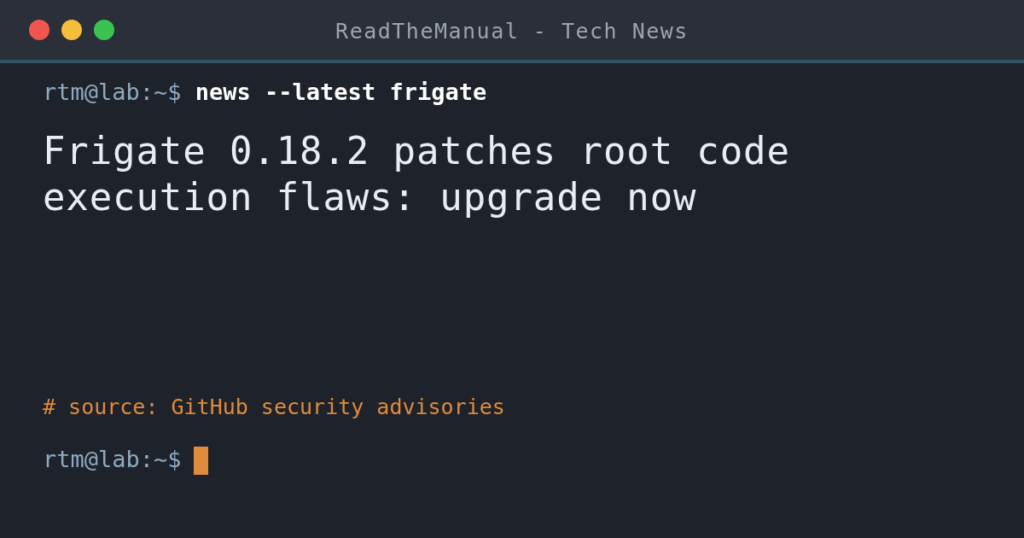
If you run Frigate 0.18.0 or 0.18.1, upgrade to 0.18.2 now. It fixes a flaw (CVSS 9.9) that lets any logged-in user, even a viewer account, run commands as root in the container. Pin the 0.18.2 tag, copy your config folder, pull and restart. It also includes the three 0.18.1 fixes, among them the admin check bypass.
Last updated 16 October 2026. Sources are linked in the text and listed at the end.
What changed
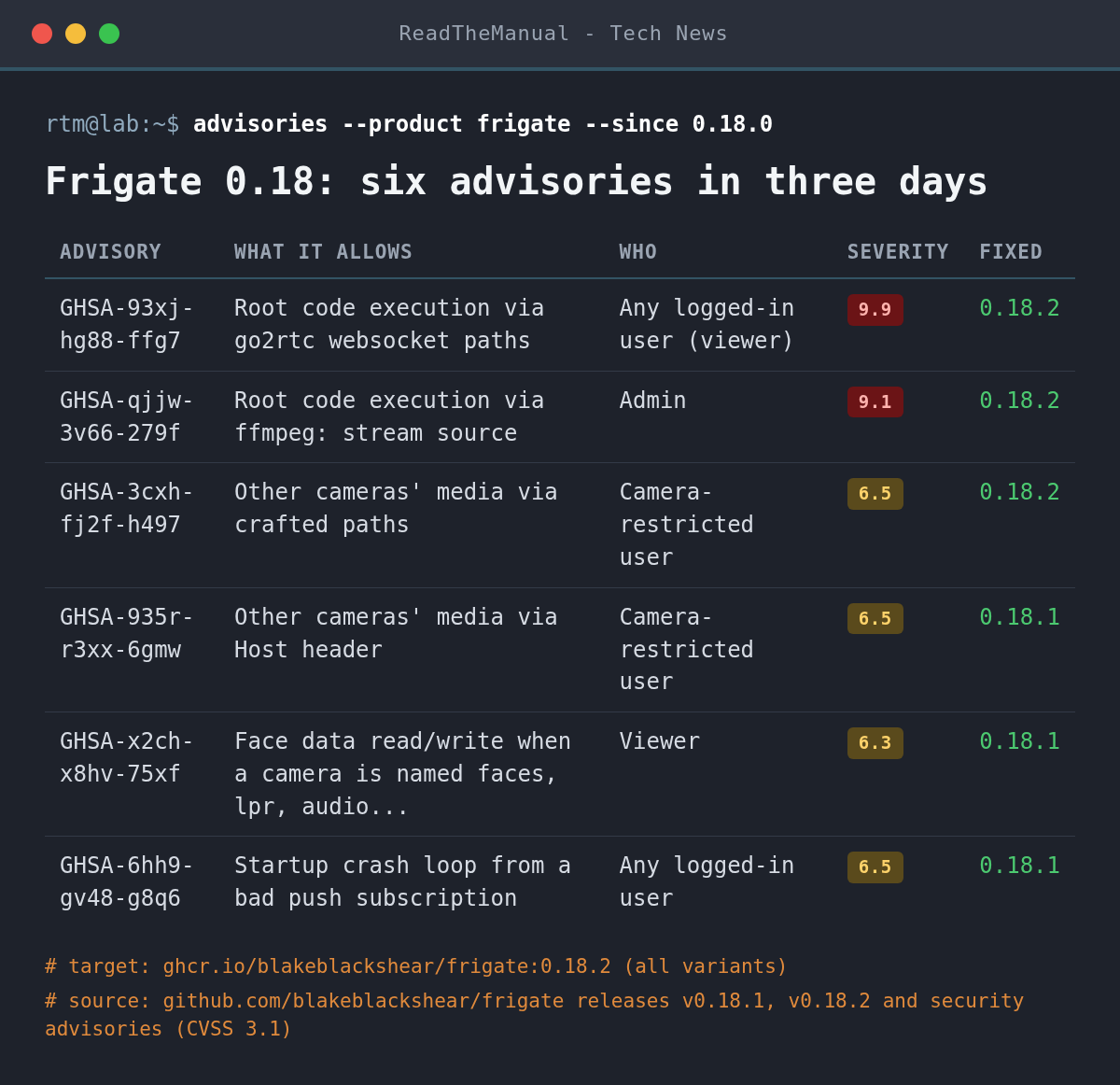
Frigate shipped two maintenance releases for the 0.18 line in three days. 0.18.1 landed on 13 October with three security fixes and a batch of stability work. 0.18.2 followed on 15 October with three more security fixes and nothing else. Each fix has a GitHub security advisory (GHSA). None had a CVE ID assigned when we checked on 16 October.
The two critical fixes in 0.18.2
GHSA-93xj-hg88-ffg7 (CVSS 9.9) is the serious one. Three live-view websocket paths are proxied by nginx straight to go2rtc, the streaming component bundled inside Frigate, and skip the filter that blocks dangerous stream sources. The only check on those paths is a camera restriction that the built-in viewer role is exempt from by default. Any authenticated account can therefore start an attacker-controlled ffmpeg process, write files anywhere in the container and run code as root. It needs a login, but not an admin one. Affected: 0.18.0 and 0.18.1.
GHSA-qjjw-3v66-279f (CVSS 9.1) is the admin-level version. The blocklist added after the earlier CVE-2026-25643 catches exec:, echo: and expr: stream sources but not ffmpeg:, which go2rtc expands into exec: internally. An admin, or anyone holding an admin session, gets root code execution. The advisory points out that Frigate’s documented setup often runs the container privileged with host paths mounted, which makes escaping the container a realistic next step.
The third 0.18.2 fix, GHSA-3cxh-fj2f-h497 (6.5), lets a user restricted to some cameras read other cameras’ clips, recordings and live streams with paths such as //clips/.... Part of it was a regression introduced by the 0.18.1 fix for the Host header bypass.
What 0.18.1 fixed, including the admin check bypass
The admin check bypass is GHSA-x2ch-x8hv-75xf (CVSS 6.3, medium). Frigate waives its default admin requirement for any URL whose first segment matches a camera name. Name a camera faces, lpr, audio or classification and viewer accounts can read the face registry and write face-training data. It affects every release from 0.17.0-beta1 to 0.18.0. The other two: GHSA-935r-r3xx-6gmw, where a # in the Host header bypassed per-camera media checks, and GHSA-6hh9-gv48-g8q6, where any logged-in user could register a malformed push subscription that crashes Frigate on every start.
0.18.1 also carries the non-security work: lower CPU use with Intel QSV on high frame rate cameras, a semantic search reindexing fix, backed-off restarts when a recording stream goes stale, and record status no longer sticking on offline after an ffmpeg restart.
What it means for your homelab
Frigate is often the most exposed thing in a home setup: the camera feed people want on their phone away from home. If yours is reachable from the internet, through a port forward, a tunnel or a reverse proxy, any account on it, including the one you gave a family member, is now a route to root in the container. Upgrade first and review the accounts second.
If you are still on 0.17.x, the two critical 0.18.2 advisories list 0.18.0 as the first affected version, but 0.17.2 has its own unfixed issues that 0.18.0 closed. The jump to 0.18 has real breaking changes (GenAI config, snapshots, zone and mask format, FFmpeg 8), so read the 0.18.0 notes before you move.
Until you can upgrade, keep Frigate off the open internet (our UFW guide shows how to limit a service to your LAN), delete viewer accounts nobody uses, and do not leave admin sessions open on shared devices. Those steps narrow who can reach the bugs; they do not fix them.
How do I check my version and upgrade?
Check what is running. The Frigate image has curl and answers on its internal API port, so this works without logging in (change frigate if your container has another name):
docker exec frigate curl -s http://127.0.0.1:5000/api/versionBack up before you pull. Frigate keeps its config and its SQLite database (frigate.db) in the config folder. Stop the container and copy the folder (the path is whatever you mount to /config):
docker compose stop frigate
cp -a ./config ./config-backup-$(date +%F)
Pin the version in docker-compose.yml. The install docs use :stable, which tells you nothing about what is actually running. Keep any hardware suffix you already use (-tensorrt, -rk, -rocm, -standard-arm64, -tensorrt-jp6, -synaptics):
image: ghcr.io/blakeblackshear/frigate:0.18.2docker compose pull frigate
docker compose up -d frigate
docker exec frigate curl -s http://127.0.0.1:5000/api/versionThen check the things that break quietly: live view loads for each camera, the detector shows inference speed under System metrics, and a new recording segment appears within a few minutes. If you run Frigate as a Home Assistant app (add-on), update it from Home Assistant and confirm it reports 0.18.2 before assuming you are covered.
Career Context: The 9.9 here is a textbook broken access control chain: a proxy route that skipped the filter its sibling route enforced, plus a role check the default role was exempt from. Being able to read an advisory like this, name the trust boundary that failed, and turn it into “which of our systems run this, which version, who can log in” is exactly the vulnerability management work security analyst and platform engineer interviews probe.
Sources
- Frigate 0.18.2 release notes (GitHub, 15 October 2026)
- Frigate 0.18.1 release notes (GitHub, 13 October 2026)
- Frigate security advisories (GHSA-93xj-hg88-ffg7, GHSA-qjjw-3v66-279f, GHSA-3cxh-fj2f-h497, GHSA-x2ch-x8hv-75xf, GHSA-935r-r3xx-6gmw, GHSA-6hh9-gv48-g8q6)
- Frigate 0.18.0 release notes and breaking changes (GitHub)

ReadTheManual is run, written and curated by Eric Lonsdale.
Eric has over 20 years of professional experience in IT infrastructure, cloud architecture, and cybersecurity, but started with PCs long before that.
He built his first machine from parts bought off tables at the local college campus, hoping they worked. He learned on BBC Micros and Atari units in the early 90s, and has built almost every PC he’s used between 1995 and now.
From helpdesk to infrastructure architect, Eric has worked across enterprise datacentres, Azure environments, and security operations. He’s managed teams, trained engineers, and spent two decades solving the problems this site teaches you to solve.
ReadTheManual exists because Eric believes the best way to learn IT is to build things, break things, and actually read the manual. Every guide on this site runs on infrastructure he owns and maintains.
Enjoyed this guide?
New articles on Linux, homelab, cloud, and automation every 2 days. No spam, unsubscribe anytime.