Raspberry Pi Imager 2.0.12 is worth updating to before your next flash. It now refuses truncated downloads instead of writing half an image and reporting success, and it fixes Wi-Fi settings that couldn’t connect to WPA3 networks. It also closes a file-handling flaw when it runs as root. It’s the stable release, published on GitHub on 8 October.
Last updated 9 October 2026. Sources are linked in the text and listed at the end.
What changed
From the release notes:
- Write reliability. Imager now refuses a short download or a truncated
.img.xz, the format every Raspberry Pi image ships in, rather than writing part of it and calling it a success. Cancelling during customisation no longer shows the success screen for a half-written card. On Linux, writes go sequentially and the io_uring write path has been reworked. - Wi-Fi and WPA3. Older versions stored a key derived from your Wi-Fi password rather than the password itself. That derived key can’t negotiate WPA3/SAE, so NetworkManager fell back to WPA2 or failed on WPA3-only networks. 2.0.12 stores the password itself and drops any derived key saved by an earlier version. Passwords containing a backslash or a leading space are now escaped properly too.
- Running as root. With sudo or pkexec, Imager could be tricked through a symlink into creating its settings file anywhere on the system. It now creates that file as the user who ran it. It also reads SSH keys and writes exports as that user.
- The network installer now waits for a proper DHCP address before fetching the OS list. If that first fetch fails, it tries again after 30 seconds. It can sign in to Raspberry Pi Connect with a QR code and short code, and import SSH public keys from a GitHub username.
- Interface. Internal eMMC is now labelled as eMMC rather than as an SD card reader, which had invited people to overwrite an eMMC system drive.
What it means for your homelab
Update Imager before you flash your next Pi, especially if your Wi-Fi is WPA3. If a Pi you set up with an older version won’t join a WPA3-only network, you don’t need to reflash it. Connect it by Ethernet or the console and enter the Wi-Fi password again with nmcli, or re-run the customisation with 2.0.12.
If you run Imager with sudo on a shared machine, the root-handling fixes alone make the update worthwhile.
Career Context: Refusing truncated images and not letting a privileged tool write files as root are the same provisioning hygiene you’d expect in any build pipeline: check the artefact before you deploy it, and give tools only the privilege they need.
Run it yourself
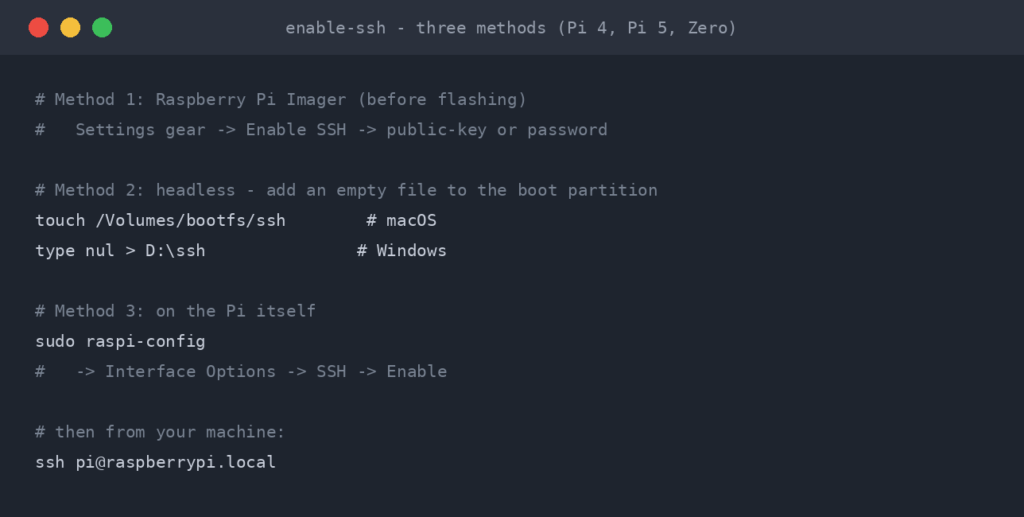
Download 2.0.12 from the GitHub release page. It has DEB packages for amd64, arm64 and armhf, desktop and CLI AppImages for x86_64, aarch64 and armhf, plus Windows and macOS installers. Once a card is written, enable SSH on the Pi and carry on with Docker on Raspberry Pi.
Sources
- Raspberry Pi Imager v2.0.12 release notes (GitHub, 8 October 2026)
- Raspberry Pi Imager 2.0.12 Brings WPA3 Fixes, Safer Image Writing (Linuxiac)
- Raspberry Pi Imager 2.0.12 Released with Sequential Writes via io_uring on Linux (9to5Linux)

ReadTheManual is run, written and curated by Eric Lonsdale.
Eric has over 20 years of professional experience in IT infrastructure, cloud architecture, and cybersecurity, but started with PCs long before that.
He built his first machine from parts bought off tables at the local college campus, hoping they worked. He learned on BBC Micros and Atari units in the early 90s, and has built almost every PC he’s used between 1995 and now.
From helpdesk to infrastructure architect, Eric has worked across enterprise datacentres, Azure environments, and security operations. He’s managed teams, trained engineers, and spent two decades solving the problems this site teaches you to solve.
ReadTheManual exists because Eric believes the best way to learn IT is to build things, break things, and actually read the manual. Every guide on this site runs on infrastructure he owns and maintains.
Enjoyed this guide?
New articles on Linux, homelab, cloud, and automation every 2 days. No spam, unsubscribe anytime.