No budget? No problem. Spin up your own Azure tenant, explore core services at zero cost, your gateway to modern business hosting
Overview
Microsoft Azure powers millions of enterprises, but you don’t need deep pockets to get hands-on. With a Free Azure account and the rich ecosystem of developer tools, you can learn cloud fundamentals, deploy real workloads, and build a career-ready portfolio, without spending a penny. Every free amount below was checked against Microsoft’s pricing pages on 15 September 2026; the free tier changes, and this page is kept current.
If you have ever wanted a homelab and not had the hardware, this is one: virtual machines, databases, websites on your own domain, containers and some AI services, for nothing. And if you are on a service desk wondering where cloud engineering starts, it starts here.
Learn Azure for Free
Step 1: Sign Up for Your Free Azure Tenant
- Visit the Azure Free Account page: https://azure.microsoft.com/free/
- Click Start Free and sign in with a Microsoft account (or create one).
- Enter your billing details. Microsoft requires a credit or debit card (not prepaid) to verify identity. A one-dollar temporary authorisation appears and is reversed. You are not charged unless you use more than the free amounts.
- Receive $200 credit valid for 30 days, plus 20+ popular services free for 12 months and 65+ always-free services.
- At the end of the 30 days you are asked to move to pay-as-you-go. Moving costs nothing by itself and keeps the 12-month and always-free amounts. If you do not move, the account and everything in it is disabled.
Why? The free tier and credits let you experiment with VMs, storage, serverless, and more, mirroring real enterprise usage patterns.
Step 2: Explore Free Services & Tools
Azure’s free offerings cover compute, data, storage and AI. Figures as published on the Azure free services page, 15 September 2026.
Free for 12 months (the clock starts at sign-up):
- Virtual Machines: 750 hours each of a B2pts v2 (Arm) and a B2ats v2 (AMD) burstable VM, with separate allowances listed for Linux and for Windows. 750 hours is one VM running all month, so that is one VM of each size for a year per operating system. Windows Server needs the x64 size (B2ats v2); the Arm size is for Linux.
- PostgreSQL and MySQL Flexible Server: 750 hours of a Burstable B1MS instance each, with 32 GB storage and 32 GB backup.
- Managed Disks: two 64 GB P6 SSDs, 1 GB of snapshots, 2 million I/O operations.
- Storage: 5 GB Blob (LRS hot), 100 GB Azure Files, and a Standard-tier Container Registry with 100 GB.
- Key Vault: 10,000 transactions.
- AI (12 months): Vision (5,000 transactions per tier), Custom Vision, Document Intelligence (500 pages).
Always free (no expiry, on every account):
- App Service: up to 10 web or API apps with 1 GB storage and 1 hour of CPU a day (the F1 tier).
- Static Web Apps: 100 GB bandwidth, 2 custom domains and 0.5 GB per app. A blog on your own domain, for nothing.
- Functions: 1 million requests a month of serverless compute.
- Container Apps: 180,000 vCPU-seconds, 360,000 GiB-seconds and 2 million requests a month.
- Azure SQL Database: the free offer gives up to 10 serverless databases with 100,000 vCore-seconds and 32 GB each. Real SQL Server, always free.
- Cosmos DB: 1,000 request units a second and 25 GB.
- Azure DevOps: 5 users with unlimited private Git repos and pipelines.
- AI (always free): AI Search (50 MB, 10,000 documents, 3 indexes), Speech to Text (5 audio hours a month), Text to Speech (500,000 characters a month), Translator (2 million characters a month), Language (5,000 text records), Bot Service. Azure OpenAI is not on the free list.
- Bandwidth: 100 GB outbound a month, with another 15 GB for the first 12 months.
Plus, you get developer tooling out of the box:
- Azure Portal: Browser-based UI to manage resources.
- Azure CLI & Cloud Shell: Command-line access to everything, preinstalled in your browser.
- VS Code Extensions: Integrate Azure services directly into your editor.
- Azure SDKs: Browse libraries for .NET, Java, Python, JavaScript.
What You Learn: Resource provisioning, IaC basics, cost monitoring, and service-specific patterns (VMs, serverless, storage).
Step 3: Build Your First Resource
- Before anything else: Cost Management + Billing, create a budget, alert at £1. Then Create a Resource → Virtual Machine.
- Pick the B2pts v2 (Arm) or B2ats v2 (AMD) size, which are the free ones, and choose an Ubuntu image (or a Windows image on the B2ats v2, as Windows Server isn’t offered on the Arm size). Ubuntu on Arm is fine for almost everything you will learn on.
- Configure networking, storage (use free tier options).
- Review estimated costs. They should show $0/month under the free allowances. If they do not, you have picked the wrong size.
- Click Review + Create → Create, then SSH/RDP into your VM.
Why? Hands-on VM deployment teaches you networking, security groups, and compute fundamentals, the bread and butter of cloud roles.
Step 4: Add Windows Server, Free for 180 Days
The free tier is not only Linux. Microsoft’s Evaluation Centre gives you Windows Server 2025, Standard and Datacenter editions, as a 180-day evaluation. Register, then download it as an ISO, a VHD, or deploy it straight into Azure.
- In Azure: the free 750 hours cover a Windows VM as well as Linux, so a Windows Server 2025 box on a B2ats v2 costs nothing for the first year.
- At home: the ISO installs under Hyper-V, Proxmox or VirtualBox on any spare machine. Make it a domain controller and you have the same Active Directory your employer runs.
- Check the clock:
slmgr /dlvshows the days remaining on the evaluation and whether a rearm is still available. Rebuild from the ISO when it runs out; a lab is meant to be rebuilt.
Why? Most Azure roles in the UK are hybrid: Entra ID in the cloud, Active Directory on premises, and the join between them. A free Server 2025 lab next to a free Azure tenant is the whole picture for nothing.
From the Desk of Someone Who Uses Azure Every Day
I manage Azure infrastructure professionally. It is what pays my bills. I have worked through Microsoft’s training, deployed production workloads, and spent more hours than I care to admit in the Azure Portal. So when I say you can learn Azure without spending a penny, I am not guessing. I have watched colleagues go from zero to AZ-104 certified using nothing but free resources and the free tier.
The free tier is genuinely useful. It is not a demo environment with training wheels. It is real Azure, with real services, and real limitations you will learn to work around. That constraint is actually the point. Learning to build within limits teaches you more about cost management and architecture than an unlimited sandbox ever would.
What the Free Tier Actually Gives You
Let me cut through the marketing and tell you what you can realistically build with the Azure free tier.
The $200 credit (first 30 days) is your experimentation window. Use it to spin up services you would not normally touch: deploy an AKS cluster, test Azure Firewall, play with Application Gateway. These are expensive services you would never run long-term on free tier, so use the credit to get hands-on while you can.
The 12-month free services are where the real learning happens:
- Two burstable VMs (750 hours a month each of a B2pts v2 and a B2ats v2): That is two VMs running 24/7, one Arm and one AMD (the allowance is listed separately for Linux and Windows). Enough for a web server, a DNS server, a jumpbox, or a small Linux lab. I would recommend Ubuntu; it is what you will see in most production environments. Run two of the same type and the second one is billed.
- PostgreSQL or MySQL Flexible Server (750 hours a month each): A managed database server all month. Connect it to your VM, build a basic app, understand connection strings and firewall rules.
- Managed Disks (2x 64GB P6 SSD): Decent storage for a learning environment. Not huge, but enough to understand how Azure storage tiering works.
- Blob Storage (5GB LRS): Upload files, serve static websites, learn about storage accounts and access tiers. These are bread-and-butter Azure skills.
- Container Registry (Standard, 100 GB): Your own image registry for a year. Push what you build, pull it into Container Apps.
The always-free services are the ones you will keep using forever:
- Azure Functions (1 million executions/month): Serverless compute. Build an API, process webhooks, automate tasks. This is where modern cloud architecture is heading.
- App Service (10 apps, 1GB) and Static Web Apps (2 custom domains): Host web apps and static sites without managing VMs. Good for understanding PaaS vs IaaS, and a real website on your own domain.
- Azure SQL Database free offer (10 databases, 32 GB each): A real managed SQL Server, and unlike the VMs it never expires.
- Cosmos DB (1,000 RU/s, 25 GB) and Container Apps: A NoSQL database and a place to run containers on demand. Between them and Functions, that is most of a modern serverless stack.
- AI services: Speech, Translator, Language and AI Search all have monthly free amounts that never expire. Azure OpenAI does not; budget for that or use the $200 credit to try it.
- Azure DevOps (5 users, unlimited repos): CI/CD pipelines, boards, repos. This alone would cost you money on other platforms.
- Microsoft Entra ID (Free): Identity management. Understanding Entra ID is essential for any Azure role.
What you can realistically build: a web app on App Service or Static Web Apps backed by the free SQL Database, with a Functions or Container Apps API, blob storage for uploads, and a VM running as a jumpbox or utility server. That is a legitimate three-tier architecture, the same pattern you will see in enterprise environments. It is also a homelab in the cloud, with the one honest difference that you do not own it: Microsoft sets the price, the twelve-month clock is theirs, and they can close the account. Free to learn on, and when you outgrow it you know exactly what to build at home.
The Learning Path That Actually Works
I have seen people waste months jumping between random tutorials. Here is the structured approach that actually works, based on what I have seen with colleagues who went from career-changers to Azure-certified.
Phase 1: Fundamentals (Weeks 1-4)
- AZ-900 is optional and is not a prerequisite for AZ-104. If you are new to IT, the free AZ-900 learning path on Microsoft Learn is a gentle start; if you already work in IT, go straight to the AZ-104 study guide.
- Use Microsoft Learn modules. They are free, structured, and include sandboxes where you do not even need your own subscription.
- Do not just read. Every module that has a sandbox exercise, do it. Muscle memory matters.
Phase 2: Hands-On (Weeks 5-8)
- Sign up for the free tier and start deploying. Create a resource group, deploy a VM, configure a network security group.
- Break things on purpose. Delete a resource and see what happens to dependent resources. Change a firewall rule and watch connectivity drop. This is how you learn.
- Use the Azure CLI from day one. The portal is great for learning what exists, but the CLI is what you will use in real jobs.
Phase 3: Build Something Real (Weeks 9-12)
- Pick a project: a personal website, a monitoring dashboard, a small API. Deploy it to Azure using what you have learned.
- Document what you build. Screenshot your architecture, write up the decisions you made and why. This becomes your portfolio.
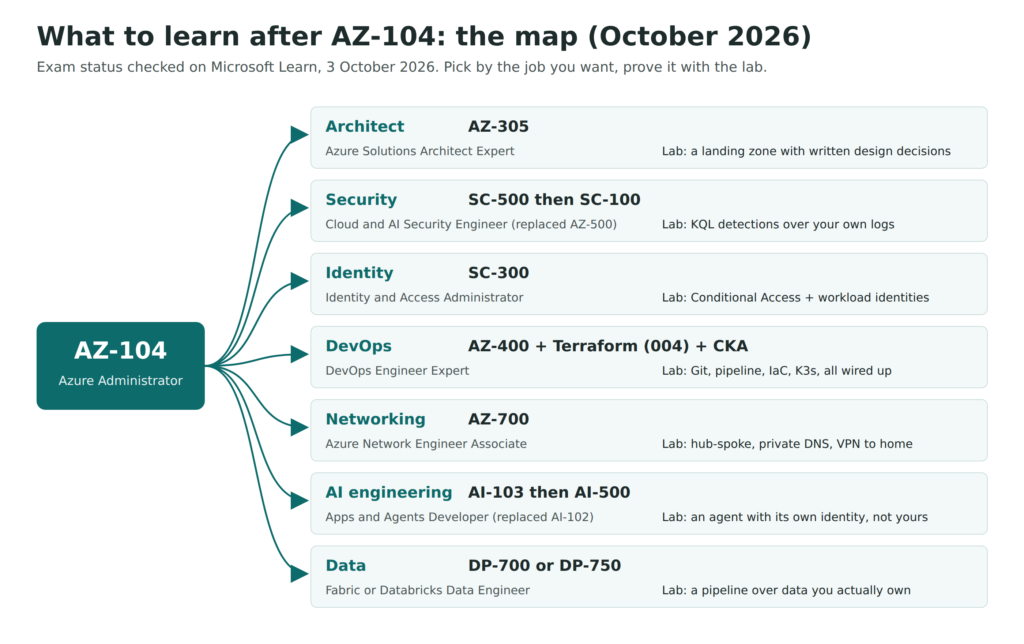
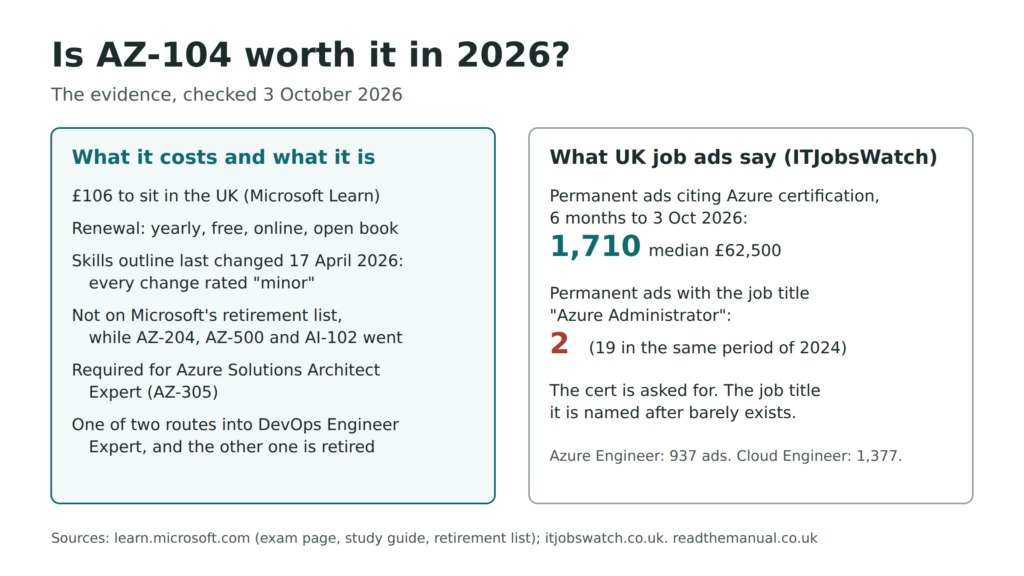
- Start looking at the AZ-104 material, the admin cert that opens doors to actual Azure roles.
The key is not to rush. I see people trying to cram AZ-104 in two weeks without ever deploying a resource group. That is like studying for a driving test without ever sitting in a car.
Gotchas That Will Cost You Money
The free tier is genuinely free, until it is not. Here are the traps I have seen people fall into:
- Set up a spending alert immediately. Go to Cost Management + Billing and create a budget with alerts at £1, £5, and £10. Do this before you deploy anything. I am not joking. Do it first.
- Deallocate VMs when you are not using them. A stopped VM in the portal is not the same as a deallocated VM. “Stopped” still incurs compute charges. You need to explicitly deallocate.
- Watch out for data egress. Uploading data to Azure is free. Downloading it is not. Small amounts are fine, but if you are streaming or downloading large datasets, the bill adds up.
- Public IP addresses are not in the free allowances. A Standard public IP on a VM is billed by the hour from the day you create it (the $200 credit covers it for the first 30 days). Multiply that by a few forgotten resources and it adds up.
- Delete resource groups, not individual resources. If you delete a VM but forget the disk, network interface, and public IP, those orphaned resources keep costing you. Always clean up at the resource group level.
- 750 hours is one VM. The allowance is 750 hours a month each of one Arm size and one AMD size (per operating system). A second VM of the same size and OS runs the hours down twice as fast, and anything over 750 is billed.
- Not every AI service is free. Speech, Translator, Language and AI Search have free monthly amounts. Azure OpenAI does not, and a chat model left running against a script will spend real money fast.
- The 30-day decision. When the $200 credit period ends you are asked to move to pay-as-you-go. Do it, with the budget alert already in place; if you do not, the account is disabled and your resources with it.
- The free tier clock starts when you sign up, not when you deploy. If you sign up and wait three months to start, you have already burned three months of your 12-month free services.
My honest advice: treat the free tier like real money. The habits you build around cost management now are the same habits that will save your employer thousands later. That is a skill hiring managers value enormously.
Pair It With a Homelab
Here is something most Azure tutorials will not tell you: the best cloud engineers I have worked with also run homelabs.
Why? Because understanding what happens underneath the cloud (the networking, the storage, the compute, the hypervisors) makes you dramatically better at using the cloud. When you deploy a VM in Azure, you are deploying onto someone else’s hypervisor. If you have run Proxmox or Hyper-V at home, you understand the layer beneath. That understanding shows in interviews and on the job.
My setup: Azure by day for enterprise workloads, homelab by night for learning, testing, and running services I want to own. The two are not competing; they are complementary. Azure teaches you scale, automation, and enterprise patterns. A homelab teaches you fundamentals, troubleshooting, and sovereignty.
If you are serious about a career in infrastructure or cloud, do both. The combination of cloud certification and hands-on homelab experience puts you ahead of candidates who only know one side.

Frequently Asked Questions
Can you learn Azure completely for free in 2026?
Yes for the fundamentals. Microsoft offers a free tenant, 65+ always-free services (Functions, App Service, Static Web Apps, Container Apps, Azure SQL Database, Cosmos DB and more), 20+ services free for 12 months including two virtual machines, and 200 USD of credit for 30 days on new accounts. Enough to complete AZ-900 and most of AZ-104 without paying a penny.
What are the always-free Azure services?
The most useful for learning are Azure Functions (1 million requests a month), Static Web Apps (2 custom domains), Azure SQL Database (10 databases, 32 GB each), Cosmos DB (1,000 RU/s), Container Apps, Azure App Service (F1 tier), Azure DevOps (5 users) and Entra ID Free. Virtual machines and Container Registry are free for 12 months, not always. Full list is on the Azure free services page.
Is Microsoft Learn enough to pass AZ-104?
It is enough for the theory but not the hands-on. Microsoft Learn gives you the concepts and sandboxes for guided labs. To pass consistently you also need to build your own resources in your own tenant, break them, and troubleshoot without a script.
How do I set up an Azure free tenant for learning?
Sign up at azure.microsoft.com/free with a Microsoft account (or GitHub account) that has not had an Azure free account before. You’ll get a 30-day 200 USD credit, 20+ services free for 12 months, access to all always-free services indefinitely, and a clean tenant to practise identity, governance, and resource deployment without risking anything.
RTFM Apparel · printed in the UK


ReadTheManual is run, written and curated by Eric Lonsdale.
Eric has over 20 years of professional experience in IT infrastructure, cloud architecture, and cybersecurity, but started with PCs long before that.
He built his first machine from parts bought off tables at the local college campus, hoping they worked. He learned on BBC Micros and Atari units in the early 90s, and has built almost every PC he’s used between 1995 and now.
From helpdesk to infrastructure architect, Eric has worked across enterprise datacentres, Azure environments, and security operations. He’s managed teams, trained engineers, and spent two decades solving the problems this site teaches you to solve.
ReadTheManual exists because Eric believes the best way to learn IT is to build things, break things, and actually read the manual. Every guide on this site runs on infrastructure he owns and maintains.
Enjoyed this guide?
New articles on Linux, homelab, cloud, and automation every 2 days. No spam, unsubscribe anytime.