Search for “Azure AI Foundry” today and you land on a product that has changed its name twice, its resource model once and its agent API once, all inside about eighteen months. Half the tutorials still tell you to create a hub. The Microsoft pricing page says the platform is free. Both of those are true in a way that will cost you money if you take them at face value.
This page answers the three things people are actually asking: what Foundry is now, how to create one properly, and what it costs. The cost part is the bit nobody publishes. Foundry has no page of its own in the Azure pricing calculator, so I pulled the real UK South list prices from Microsoft’s public Retail Prices API and worked out which parts bill while nothing is running. The queries are at the bottom so you can rerun them on the day you read this.
Last updated 3 October 2026. Verified against Microsoft Learn (Foundry architecture, rollout, networking and cost pages, all updated August to September 2026) and the Azure Retail Prices API in GBP on 3 October 2026. No tenant was used: the create commands are Microsoft’s documented ones, and every price is a live list price, not an invoice.
Short answer
Microsoft Foundry is the current name for what was Azure AI Studio and then Azure AI Foundry. It is one Azure resource (Microsoft.CognitiveServices/accounts, kind AIServices) with child projects, giving you model deployments, agents, evaluations and the old Azure AI Services under one RBAC, networking and policy boundary. Hub-based projects still exist but live in the “Foundry (classic)” portal; Microsoft says new investment goes into Foundry projects.
The resource and its projects cost nothing to exist. Pay-per-token model deployments cost nothing until called. What bills when idle is everything you attach to make it enterprise grade: the AI Search service a standard agent setup needs (£185.13 a month on Standard S1 in UK South), private endpoints (£5.48 each), a managed firewall if you use outbound FQDN rules (£688.68 a month on the default Standard SKU), an API Management gateway, and above all any fine-tuned model you leave deployed (£936.66 a month for a gpt-4.1-mini fine-tune doing nothing).
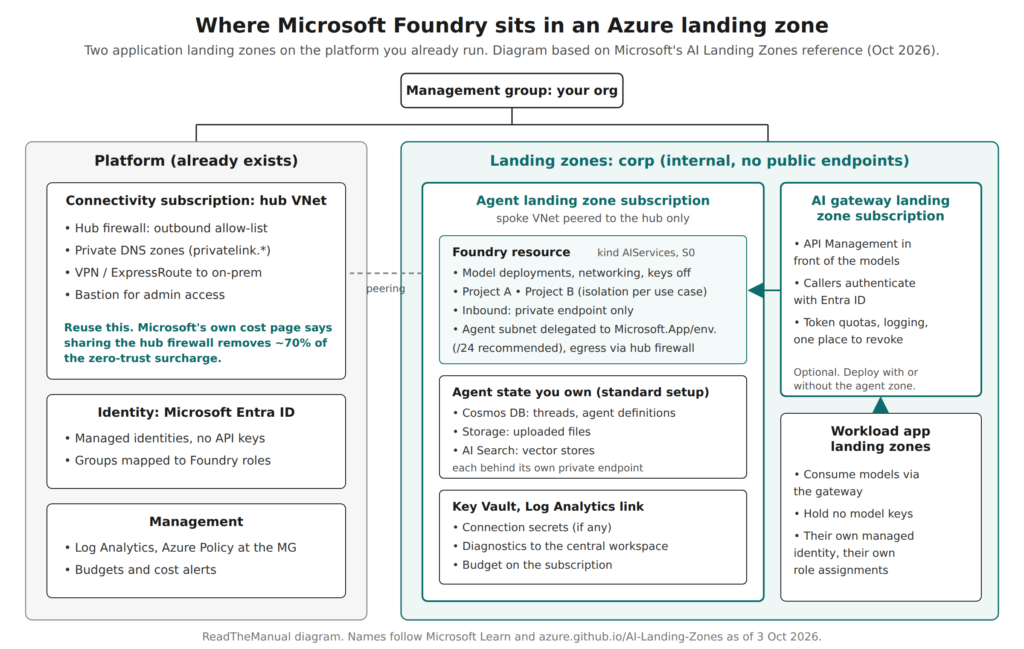
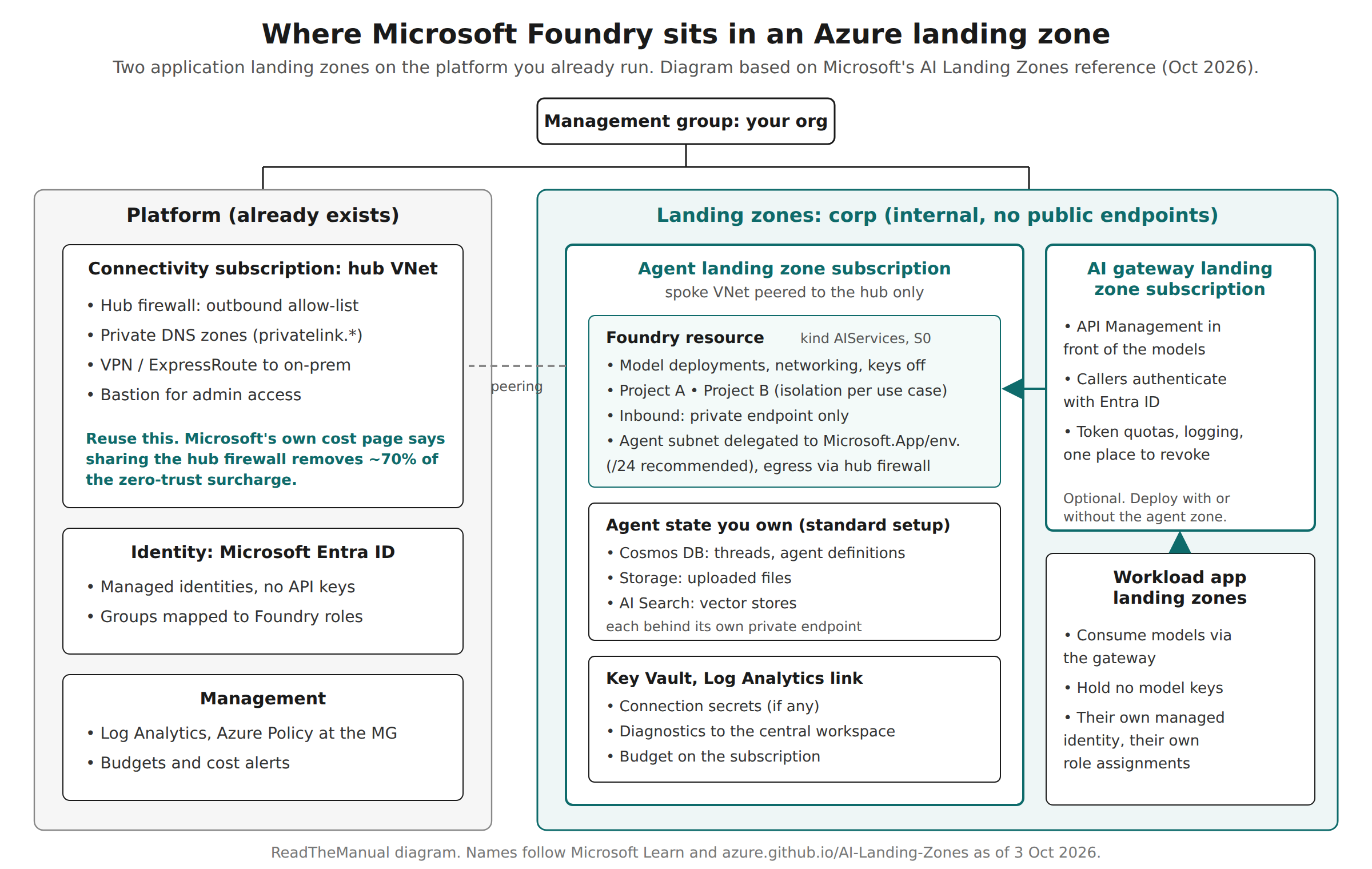
In a landing zone, Foundry is not a new kind of platform. Microsoft’s AI Landing Zones reference treats it as an application landing zone: an agent landing zone subscription, optionally a second AI gateway subscription, both peered to the hub you already run and governed by the policy you already have.
What Microsoft Foundry is in October 2026
The naming is the first trap, because search results mix three generations. Microsoft’s own migration page spells out the lineage: Azure AI Studio became Azure AI Foundry, which became Microsoft Foundry; Azure Cognitive Services became Azure AI Services, which became Foundry Tools. By Microsoft Ignite in November 2025 Microsoft’s own posts were calling it Microsoft Foundry. The Azure resource type never changed: it is still Microsoft.CognitiveServices/accounts, which is why your existing Azure Policy and RBAC on Azure OpenAI keep working after an upgrade.
The changes that matter more than the name:
| Dimension | Before | Now | Why an architect cares |
|---|---|---|---|
| Resource model | Hub + Azure OpenAI + Azure AI Services, each a separate resource | One Foundry resource with projects | One networking and RBAC boundary instead of three; projects isolate use cases |
| Portal | Foundry (classic), hub-based projects | Foundry portal, Foundry projects | Hub-based projects only show in the classic portal |
| Agent API | Assistants API (threads, runs) | Responses API (conversations, agent versions) | The Assistants API sunset was 26 August 2026; old code needs rewriting |
| RBAC role names | Azure AI User, Azure AI Owner | Foundry User, Foundry Owner | Same role IDs, so assignments in code are unaffected; docs and portal show both names for now |
The one-resource model is the improvement worth having. Under the old hub pattern an AI team could end up with a hub, an Azure OpenAI account, a separate AI Services account and the storage and Key Vault the hub dragged in, each with its own network rules. Now the Foundry resource is where you set networking, keys, model deployments and connections, and projects are where developers work. Microsoft’s architecture page is explicit that connected resources (Storage, Key Vault, AI Search) “are independent Azure resources with their own governance boundaries”, so private networking on the Foundry resource does not make its dependencies private. You do that for each one.
How to create Azure AI Foundry properly
The portal route is a few clicks: sign in to the Foundry portal with the “New Foundry” toggle on, select the project name, choose Create new project, name it and create. The portal creates the Foundry resource for you. That is fine for a personal sandbox. For anything another person will use, do it in code so you choose the region, the resource group and the settings that cannot be changed later. Microsoft’s documented Azure CLI path (CLI 2.80.0 or later):
az group create --name rg-foundry-dev-uks --location uksouth

az cognitiveservices account create \
    --name fdy-dev-uks-01 \
    --resource-group rg-foundry-dev-uks \
    --kind AIServices \
    --sku S0 \
    --location uksouth \
    --custom-domain fdy-dev-uks-01 \
    --assign-identity \
    --allow-project-management true

az cognitiveservices account project create \
    --name fdy-dev-uks-01 \
    --resource-group rg-foundry-dev-uks \
    --project-name proj-invoice-triage \
    --location uksouth
Three flags carry consequences. --allow-project-management cannot be changed after the resource exists, so a resource created without it cannot host projects. --assign-identity creates the managed identity that project management needs; without it project creation fails. --custom-domain must be globally unique and becomes part of your endpoint name, so put your naming convention in it now. UK South is on Microsoft’s list of Foundry regions, but agent and model availability varies by region, so check the specific model in Manage > Quota before you commit.
Then do the two things the quickstarts skip:
- Turn off key access. Set
disableLocalAuthtotrue(in Bicep/ARM, orSet-AzCognitiveServicesAccount -DisableLocalAuth $truein PowerShell), and enforce it with the built-in policy “Azure AI Services resources should have key access disabled (disable local authentication)” at the management group. Every caller then needs an Entra ID identity and a role. This is the single change that turns “a developer has a key in an .env file” into something you can audit and revoke. - Assign roles to groups, at the right scope. Microsoft’s starter assignment is Foundry User for developers at the Foundry resource scope, and Foundry User for each project’s managed identity. Note the rollout guide’s warning that Owner or Contributor is not enough: those are control-plane roles, and a user can manage the resource but still be unable to chat with an agent without a data-plane role.
How to use it after that is mostly the portal’s job: deploy a model (start with Global Standard, which Microsoft recommends for most workloads), try it in the playground, then build a prompt agent with instructions and tools. The architectural decisions below are the part the portal will not make for you.
Where Foundry sits in a landing zone
If you run an Azure landing zone, the question is which subscription Foundry goes in and who owns it. Microsoft’s AI Landing Zones reference answers it plainly: “The AI Landing Zone is an application landing zone”, made of an Agent Landing Zone and an AI Gateway Landing Zone that “can be deployed together or independently”. Nothing about the platform changes. I covered the four things people mean by “landing zone” in Which Azure landing zone do you actually need?; this is the application rung.
The decisions, in the order I would take them:
- Subscription. A Foundry resource per production workload boundary, in that workload’s subscription, under the corp management group if it should never be on the internet. Microsoft’s rollout guide says to treat isolation as the default for production and co-location (one resource, many projects) as a deliberate exception, because a shared resource shares its blast radius: quota exhaustion, misconfiguration and incidents. A shared sandbox resource with a project per experiment is fine for exploration. The subscription versus resource group decision applies here unchanged: if the cost, access or quota boundary differs, it is a separate subscription.
- Identity boundary. What the workload’s identity can touch. Managed identities, no keys, role assignments scoped to its own resources. The agent’s own identity matters more than the developer’s here, because an agent acts without a person in the loop; why that breaks the usual controls is in You can’t MFA an AI agent.
- Network boundary. Where its packets can go. Inbound: private endpoint on the Foundry resource and on each dependency. Outbound: agent traffic either through a subnet you delegate to
Microsoft.App/environments(Microsoft recommends a /24, and it cannot be shared between Foundry resources) and on to your hub firewall, or through a Foundry-managed virtual network. Microsoft notes that some fully private configurations cannot be set up in the portal at all, only by SDK, CLI or template. - Agent state. Basic agent setup keeps threads and files in Microsoft-managed multitenant storage. Standard setup puts conversations in your Cosmos DB, files in your Storage account and vector stores in your AI Search, isolated per project. Regulated data means standard setup. Standard setup is also where the idle costs start.
- Gateway or not. API Management in front of the models gives you one place to authenticate callers with Entra ID, apply token quotas and log usage across workloads. Microsoft’s design checklist says the AI landing zone “should use Azure API Management” for this. For one workload it is optional; for five it is how you stop five teams holding model access directly.
One UK point the region list hides. Microsoft’s deployment-types page says Global deployments “may be processed in any Azure region”, Data Zone deployments stay in the US, EU or APAC data zone, and only Standard (regional) deployments keep prompts in your chosen geography. In the UK South price list today, every GPT-5 family token meter is a Global one; the regional meters are for older models such as gpt-4.1-mini and gpt-4o. If your data protection position needs prompts processed in the UK, check the model you want actually has a regional deployment in UK South before you design around it. Data at rest stays in the geography either way.
What Foundry costs before you send a single token
Microsoft’s pricing page says “The Foundry platform is free to use and explore”. Its cost-planning page adds that Foundry “doesn’t have a dedicated page in the Azure pricing calculator because Foundry is composed of several optional Azure services.” Both are accurate. The useful question is which of those optional services bill by the hour whether or not anyone is using them. Here are the live UK South list prices.
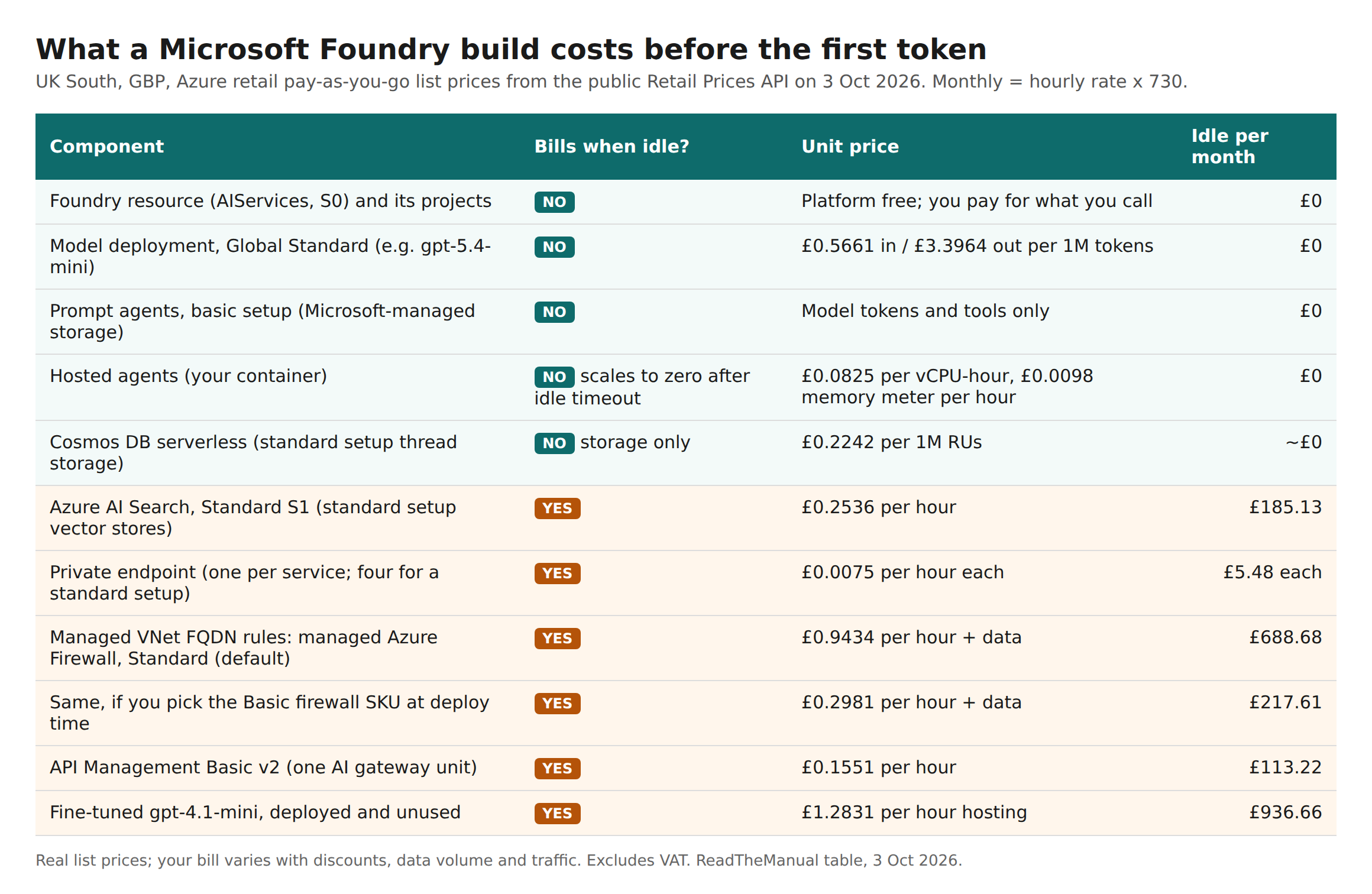
Put together, the four shapes most teams end up with look like this, using the same list prices:
| Shape | What is deployed | Idle floor per month (UK South list) |
|---|---|---|
| Sandbox | Foundry resource, one project, Global Standard model, prompt agents in basic setup | £0 |
| Standard agent setup, public endpoints | Above, plus your own Cosmos DB (serverless), Storage and AI Search S1 | about £185 |
| Standard setup, private, reusing the hub firewall | Above, plus four private endpoints (Foundry, Search, Storage, Cosmos); egress through the existing hub | about £207 |
| Standard setup, private, Foundry-managed network with FQDN rules | Above, plus the managed Azure Firewall Foundry creates for you | about £896 (Standard SKU) or £425 (Basic SKU) |
Add £113.22 a month for an API Management Basic v2 gateway unit if you put one in front. Add nothing for Cosmos DB in serverless mode until data and requests arrive; Microsoft’s standard setup supports serverless as well as provisioned throughput, and provisioned is where a forgotten minimum turns into a monthly line. Storage and Key Vault are pennies at rest.
Three findings from doing the sums that are worth more than the totals:
- The firewall is a design decision, not a Foundry cost. If you choose Foundry’s managed virtual network in “allow only approved outbound” mode and add an FQDN rule, Foundry creates a managed Azure Firewall per Foundry account. You cannot bring your own and cannot share it between accounts, and the SKU cannot be changed after deployment. If your platform team already runs a hub firewall, use your own VNet and route egress through it instead. Microsoft’s AI Landing Zones cost page makes the same point for its own build: the firewall is “roughly 70%” of the zero-trust surcharge, and sharing the hub firewall removes it.
- AI Search is the floor. Standard agent setup requires an AI Search service, and the dedicated tiers bill per hour regardless of queries. There is now a Serverless Developer tier that scales to zero (£0.2128 per compute-unit hour in the price list), but it is preview, has no SLA, and does not support private networking for indexers, so it is a sandbox option rather than a production one. Confirm it works with the agent service before relying on it.
- Fine-tuned deployments are the silent bill. Microsoft’s cost page warns that fine-tuned models incur hosting charges “even if the model is unused”. At £1.2831 an hour, one forgotten fine-tune in UK South costs more per month than a private standard setup with its own firewall. Put a budget alert on any subscription where someone can fine-tune, and a clean-up step in the process that creates them.
For comparison with the number that went round in September: Microsoft’s AI Landing Zones reference prices its own complete build at about $892 a month public, $2,184 zero trust and $2,438 with an Application Gateway, in USD, East US 2 list prices of 29 May 2026, empty and with about one user. I re-checked those figures on Microsoft’s “Deployed Resources & Cost Estimates” page on 3 October and they are unchanged. That build includes a whole workload as well as Foundry: two AI Search services, a container app node, Premium Container Registry, a jumpbox, Bastion and its own firewall. The tables above isolate the Foundry part, which is why they are smaller. The lesson is the same: the empty cost of governed AI is network and search, not the AI.
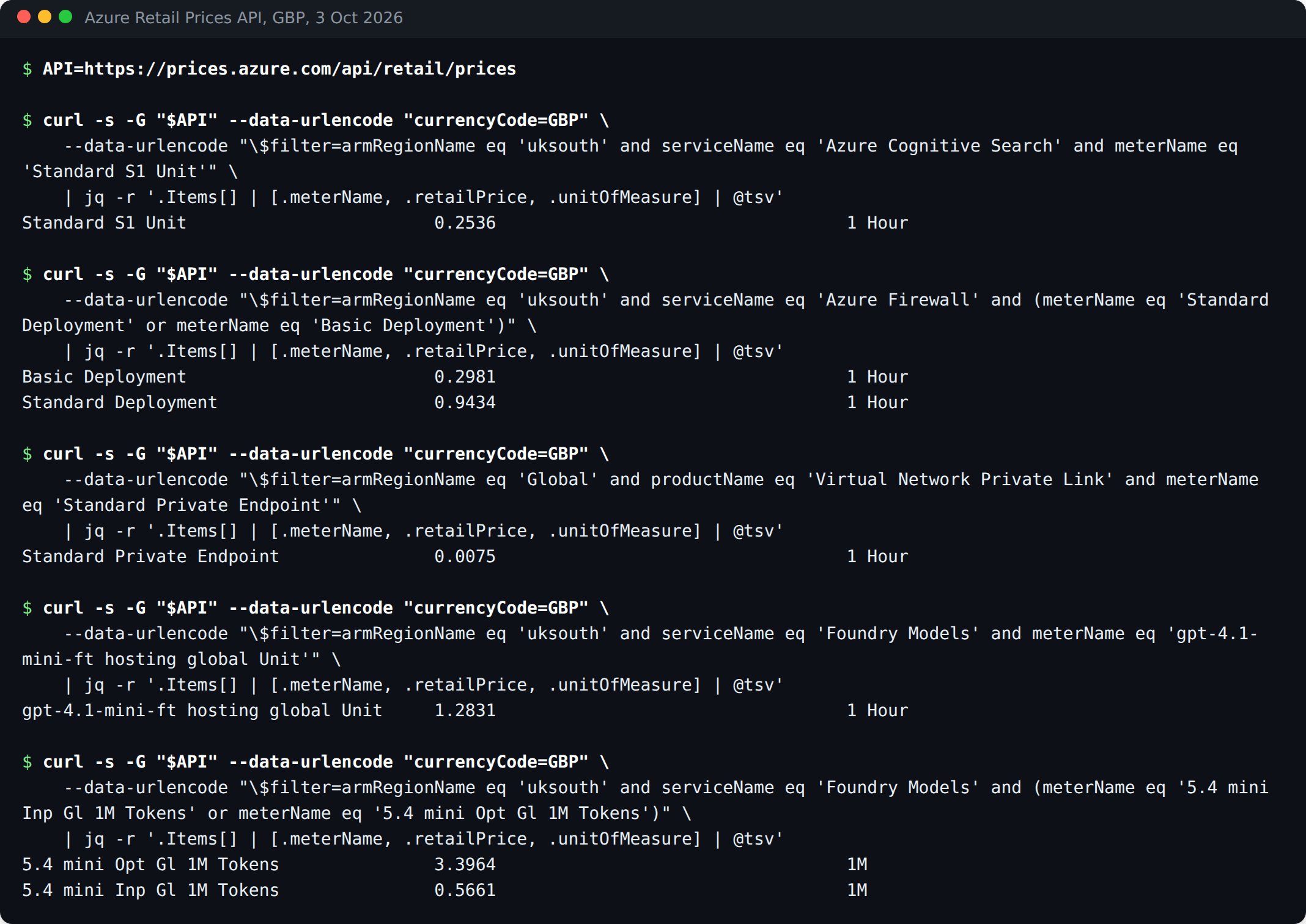
Reproduce the prices yourself. The Retail Prices API is public and needs no authentication. Every figure on this page came from queries of this shape:
API=https://prices.azure.com/api/retail/prices
q() { curl -s -G "$API" --data-urlencode "currencyCode=GBP" \
        --data-urlencode "\$filter=$1" \
      | jq -r '.Items[] | [.meterName, .retailPrice, .unitOfMeasure] | @tsv'; }

q "armRegionName eq 'uksouth' and serviceName eq 'Azure Cognitive Search' and meterName eq 'Standard S1 Unit'"
q "armRegionName eq 'uksouth' and serviceName eq 'Azure Firewall' and contains(meterName,'Deployment')"
q "armRegionName eq 'Global' and productName eq 'Virtual Network Private Link' and meterName eq 'Standard Private Endpoint'"
q "armRegionName eq 'uksouth' and serviceName eq 'API Management' and meterName eq 'Basic v2 Unit'"
q "armRegionName eq 'uksouth' and serviceName eq 'Foundry Models' and contains(meterName,'hosting')"
q "armRegionName eq 'uksouth' and serviceName eq 'Foundry Models' and contains(meterName,'5.4 mini')"
q "armRegionName eq 'uksouth' and productName eq 'Foundry Agents'"
AI Search still appears under its old service name, Azure Cognitive Search, and private endpoints are priced in the Global region rather than UK South. Those two quirks are why most people’s filters come back empty.
Verify what you built
Three checks after any Foundry deployment, all read-only:
- Keys are off:
az cognitiveservices account show -n <name> -g <rg> --query properties.disableLocalAuthshould returntrue. - Nothing is public:
--query properties.publicNetworkAccessshould returnDisabledon the Foundry resource, and the same property should be checked on the Storage, AI Search and Cosmos DB accounts, because they are governed separately. - The idle floor matches the design: in Cost Management, group the subscription by resource and then by meter after a quiet week. Microsoft’s own cost page recommends exactly this reconciliation. Any meter you cannot explain from the tables above is the conversation to have.
Why this matters at work
Most organisations meet Foundry the same way: a developer creates a resource in a sandbox subscription, copies a key into an app, and six months later it is in production with no private endpoint and a key nobody can rotate without breaking something. The architect’s job is to get there first with a pattern that is cheap enough that nobody needs to route round it. The figures above make that argument for you. A private, keyless, standard-setup Foundry that reuses the hub firewall is about £207 a month at list price; the version that creates its own firewall is four times that for the same security outcome.
If you are the person a company asks “can we use Azure OpenAI”, the answer that lands is not a feature tour. It is the subscription it goes in, the two boundaries (identity and network), the idle cost of each option, and which one you recommend. That is the same conversation as any other application landing zone, which is the point. The model is just the newest thing on the list.
Frequently asked questions
Is Azure AI Foundry the same as Microsoft Foundry?
Yes. Microsoft Foundry is the current name of the product previously called Azure AI Foundry and, before that, Azure AI Studio. The Azure resource type is unchanged.
Is Azure AI Foundry free?
The Foundry resource and its projects have no charge of their own. You pay for model tokens and for the Azure services you attach, and some of those (AI Search, private endpoints, firewalls, API Management, fine-tuned model hosting) bill by the hour whether used or not.
Should I create a hub-based project or a Foundry project?
A Foundry project. Hub-based projects only appear in the Foundry (classic) portal and Microsoft says new investment is focused on Foundry projects in the new portal.
What is the difference between Azure AI Foundry and Azure OpenAI?
Azure OpenAI is model access. A Foundry resource includes Azure OpenAI and adds projects, agents, evaluations and the other Foundry Tools under the same resource type, and an existing Azure OpenAI resource can be upgraded to a Foundry resource while keeping its endpoint.
Related reading
- Which Azure landing zone do you actually need?
- Azure subscription vs resource group: the decision
- You can’t MFA an AI agent
- The agent identity toolbox: stop your AI agents signing in as you
Official sources used for this page:
- Microsoft Learn: Microsoft Foundry architecture
- Microsoft Learn: Foundry rollout across my organization
- Microsoft Learn: Plan and manage costs for Microsoft Foundry
- Microsoft Learn: Configure managed virtual network for Foundry
- Microsoft Learn: Set up standard agent resources
- AI Landing Zones: deployed resources and cost estimates
- Azure Retail Prices API reference

ReadTheManual is run, written and curated by Eric Lonsdale.
Eric has over 20 years of professional experience in IT infrastructure, cloud architecture, and cybersecurity, but started with PCs long before that.
He built his first machine from parts bought off tables at the local college campus, hoping they worked. He learned on BBC Micros and Atari units in the early 90s, and has built almost every PC he’s used between 1995 and now.
From helpdesk to infrastructure architect, Eric has worked across enterprise datacentres, Azure environments, and security operations. He’s managed teams, trained engineers, and spent two decades solving the problems this site teaches you to solve.
ReadTheManual exists because Eric believes the best way to learn IT is to build things, break things, and actually read the manual. Every guide on this site runs on infrastructure he owns and maintains.
Enjoyed this guide?
New articles on Linux, homelab, cloud, and automation every 2 days. No spam, unsubscribe anytime.