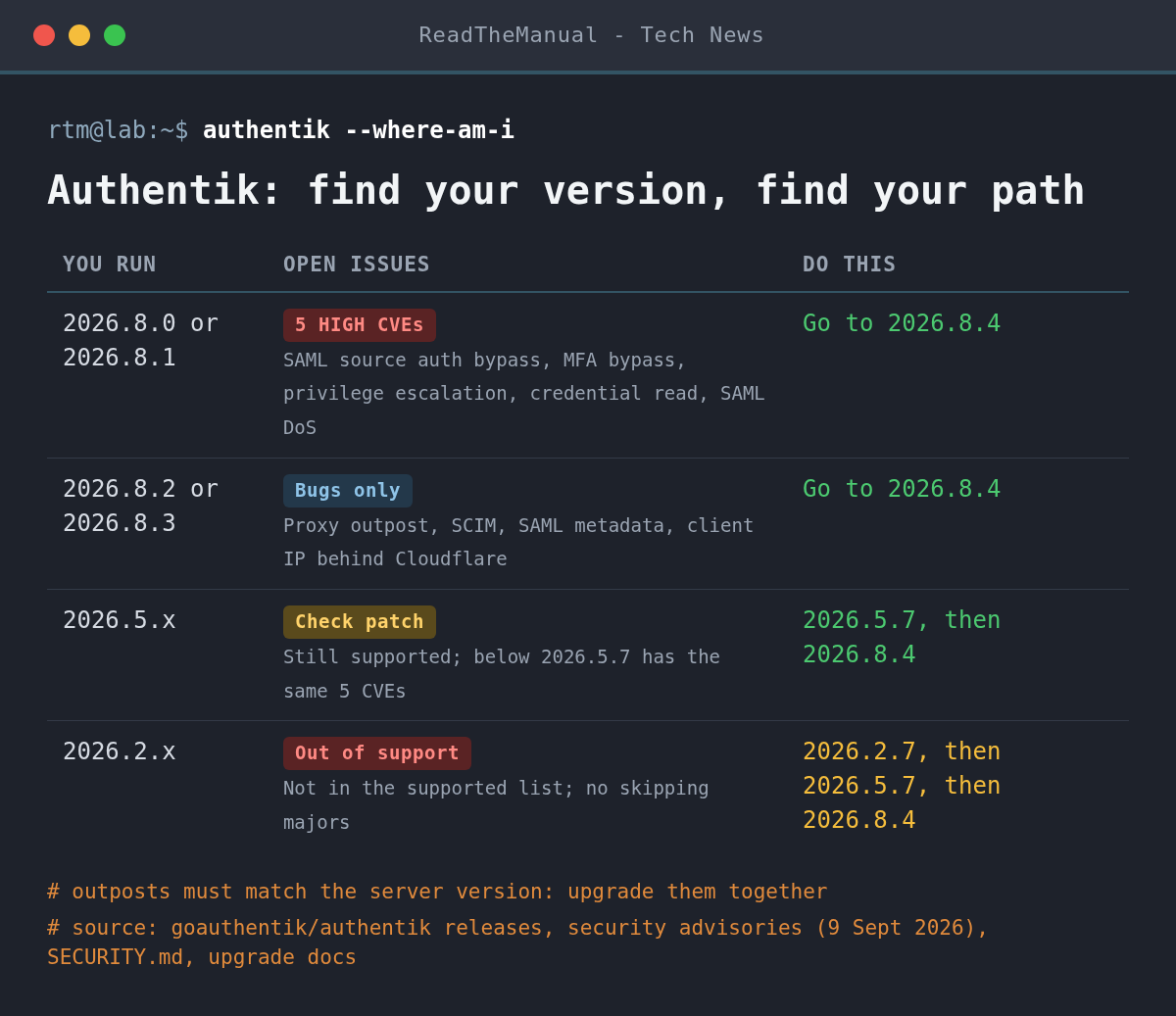
If Authentik guards your self-hosted apps, check your version today. Versions 2026.8.0 and 2026.8.1, and 2026.5.6 or older, still carry five high-severity CVEs fixed in September, including an MFA bypass. 2026.8.4 (14 October) adds no new security fixes, but it is the release to land on, and it fixes proxy outpost, SCIM and Cloudflare client IP bugs.
Last updated 16 October 2026. Sources are linked in the text and listed at the end.
What changed
Authentik 2026.8.4 is a bug-fix release with 38 changes and no security patches. We checked the project’s advisory list on 16 October and nothing names 2026.8.3 or 2026.8.4. The fixes that matter most to a homelab:
- Proxy outpost: it no longer negotiates HTTP/2 to your upstream apps, uses HTTP/1.1 for OAuth backchannel requests, and fetches the embedded outpost’s signing keys (JWKS) over a local unix socket instead of through the browser-facing hostname. The provider’s startup reconcile is now atomic. If forward-auth apps have been flaky since 2026.8, these are the likely fixes.
- Client IP behind Cloudflare: 2026.8.1 switched to taking the rightmost untrusted address in
X-Forwarded-For. Behind Cloudflare that is a Cloudflare edge address, so sessions and events showed Cloudflare instead of the real visitor (issue 25811). 2026.8.4 goes back to the leftmost address. - SCIM provider: accepts targets that report bulk operations as unsupported, fixes user conflict resolution, and shows the remote error detail on 4xx and 5xx responses, which makes a failed sync much easier to debug.
- SAML and directory sources: SAML metadata now serves only the leaf certificate from a PEM chain, SAML sources get a NameID fallback, and LDAP and Kerberos sources save the source connection when you link an existing user or group.
- Odds and ends: environment variables holding lists now parse correctly, consent stages no longer error when a user re-consents after expiry, and websockets with non-UTF-8 headers no longer fail.
The September CVEs you might still have
On 9 September Authentik published five high-severity advisories, fixed in 2026.8.2, 2026.5.7 and 2026.2.7. Each only bites if you use the feature involved, so read them against your own setup:
- CVE-2026-94606 (8.9): someone who knows a user’s password can have the email MFA code sent to their own address and sign in, if that user has not enrolled the factor yet. No workaround.
- CVE-2026-94609 (8.8): an account delegated to manage one group or user can grant superuser to anyone.
- CVE-2026-94611 (8.1): view permission on a configuration was enough to read the secrets it stores.
- CVE-2026-94613 (7.5): an unauthenticated SAML message can kill the worker handling it. Only SAML users are affected.
- CVE-2026-94612 (7.4): a SAML source accepted assertions issued for another service, and accepted them more than once. No workaround.
What it means for your homelab
Authentik sits in front of everything else, so an outdated copy is a weak point for every app behind it, and a failed upgrade locks you out of all of them at once. Both problems have the same answer: a backup you have tested and a pinned version you choose on purpose.
The project’s security policy now lists only 2026.5.x and 2026.8.x as supported, so 2026.2.x will not get further fixes. Authentik does not support downgrades or skipping a major version: from 2026.2 you go to the latest 2026.2.x, then 2026.5.7, then 2026.8.4. If you are coming from before 2026.8, read the breaking change on forwarded headers first. The server now trusts X-Forwarded-* headers only from networks listed in AUTHENTIK_LISTEN__TRUSTED_PROXY_CIDRS, and if your reverse proxy is not in that list you get mixed content errors, endless spinners or failed logins.
How do I upgrade with Docker Compose?
From your Authentik folder, see which image tag is running and whether .env pins one:
docker compose images server worker
grep AUTHENTIK_TAG .env
Back up the database and the files around it. The .env file holds your secret key, and without it a restored database is no use. These names match the official compose file; change the user and database if you set PG_USER or PG_DB:
docker compose exec -T postgresql pg_dump -U authentik -d authentik > authentik-$(date +%F).sql
mkdir -p ~/authentik-backup-$(date +%F)
cp -a .env compose.yml data custom-templates certs ~/authentik-backup-$(date +%F)/
Set the version. Either put AUTHENTIK_TAG=2026.8.4 in .env, or fetch the new official compose file, which defaults to 2026.8.4. Fetching it overwrites any edits you made to compose.yml, so diff it against your backup copy first. Then pull and restart:
docker compose pull
docker compose up -d
docker compose images server worker
Outposts must run the same version as the server. The embedded outpost updates with the server, and Authentik updates outposts it deploys through its Docker or Kubernetes integration. Any outpost you started by hand needs its image tag changed to 2026.8.4 at the same time. Afterwards, sign in through each forward-auth app, run one SCIM sync if you use it, and test one SAML login.
Career Context: Every one of the September CVEs is an identity failure you will meet at work under another name: MFA registration hijack, delegated admin escalating to global admin, SAML assertions accepted for the wrong audience or replayed. If you can explain those three to an interviewer, and say how Entra ID or Okta guards against each, you are talking like an identity engineer rather than a helpdesk tech who resets passwords.
Sources
- authentik 2026.8.4 release (GitHub, 14 October 2026)
- authentik 2026.8 release notes, breaking changes and upgrade steps (authentik docs)
- authentik security advisories (CVE-2026-94606, -94609, -94611, -94612, -94613, published 9 September 2026)
- Upgrade authentik (authentik docs)
- authentik security policy and supported versions (GitHub)

ReadTheManual is run, written and curated by Eric Lonsdale.
Eric has over 20 years of professional experience in IT infrastructure, cloud architecture, and cybersecurity, but started with PCs long before that.
He built his first machine from parts bought off tables at the local college campus, hoping they worked. He learned on BBC Micros and Atari units in the early 90s, and has built almost every PC he’s used between 1995 and now.
From helpdesk to infrastructure architect, Eric has worked across enterprise datacentres, Azure environments, and security operations. He’s managed teams, trained engineers, and spent two decades solving the problems this site teaches you to solve.
ReadTheManual exists because Eric believes the best way to learn IT is to build things, break things, and actually read the manual. Every guide on this site runs on infrastructure he owns and maintains.
Enjoyed this guide?
New articles on Linux, homelab, cloud, and automation every 2 days. No spam, unsubscribe anytime.