The AZ-104 is the certification that opens doors. While Solutions Architect (AZ-305) is more prestigious and Developer (AZ-204) is more specialized, AZ-104 Azure Administrator is where cloud careers often start – and it’s the certification hiring managers look for when they need someone who can actually run Azure infrastructure.
This series will take you from zero Azure knowledge to exam-ready, with practical skills you’ll use daily. We’re not just passing a test – we’re building real competency.
Career Impact
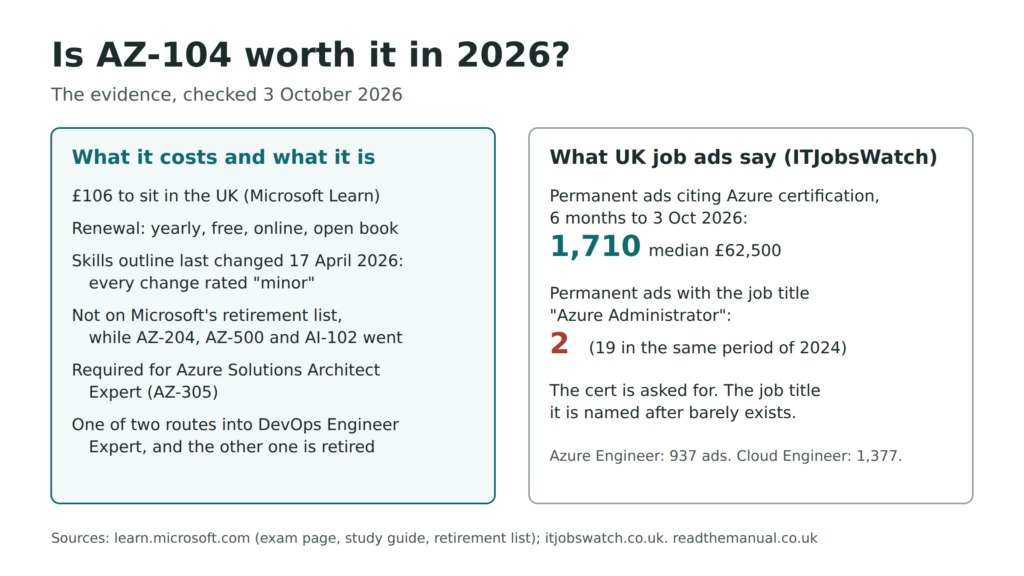
Roles that commonly ask for it: Cloud Engineer, DevOps Engineer (AZ-104 or AZ-400), Systems Administrator, Infrastructure Architect (AZ-104 + AZ-305)
What You’ll Learn
- What AZ-104 covers and why it matters
- Exam structure and passing strategies
- Study plan and resources
- How this series maps to exam objectives
Quick Reference
| Aspect | Details |
|---|---|
| Exam Code | AZ-104 |
| Title | Microsoft Azure Administrator |
| Duration | 100 minutes of exam time (allow extra seat time for check-in) |
| Questions | 40-60 |
| Passing Score | 700/1000 |
| Cost | $165 USD in the US; the price varies by the country you sit it in |
| Validity | 1 year (free renewal) |
| Prerequisites | None (but recommend 6+ months Azure experience) |
Why AZ-104?
The Career Impact
Azure certifications map directly to job requirements:
| Role | Common Requirement |
|---|---|
| Cloud Engineer | AZ-104 often requested |
| DevOps Engineer | AZ-104 or AZ-400 |
| Systems Administrator | AZ-104 preferred |
| Infrastructure Architect | AZ-104 + AZ-305 |
| Site Reliability Engineer | AZ-104 + experience |
Why Not Start with AZ-900?
AZ-900 (Fundamentals) is optional. If you have IT experience:
- AZ-900 is “what is cloud computing”
- AZ-104 is “how do I run Azure infrastructure”
Skip AZ-900 unless your employer requires it or you need the confidence boost. AZ-104 assumes you understand basic IT concepts – that’s the only prerequisite.
Exam Objectives
Microsoft organizes AZ-104 into five skill areas:
1. Manage Azure Identities and Governance (20-25%)
- Microsoft Entra ID – Users, groups, licences, external users, self-service password reset
- Role-Based Access Control (RBAC) – Roles, assignments, custom roles
- Subscriptions and Management Groups – Hierarchy, policies
- Azure Policy – Compliance, initiatives
- Cost Management – Budgets, alerts, recommendations
2. Implement and Manage Storage (15-20%)
- Storage Accounts – Types, replication, access tiers
- Blob Storage – Containers, lifecycle management
- Azure Files – File shares, snapshots and soft delete, identity-based access
- Storage Security – SAS tokens, stored access policies, access keys, encryption, firewall
3. Deploy and Manage Azure Compute Resources (20-25%)
- ARM templates and Bicep – Interpret, modify, deploy and export
- Virtual Machines – Create, size, encrypt, move, manage disks
- VM Availability – Availability sets, zones, scale sets
- Containers – Container Registry, Container Instances, Container Apps
- App Service – Plans, scaling, TLS, custom domains, backup, deployment slots
4. Implement and Manage Virtual Networking (15-20%)
- Virtual Networks – Subnets, peering, public IPs, user-defined routes, troubleshooting connectivity
- Secure Access – NSGs, ASGs, effective security rules, Azure Bastion, service endpoints, private endpoints
- Name Resolution and Load Balancing – Azure DNS, internal and public load balancers
5. Monitor and Maintain Azure Resources (10-15%)
- Azure Monitor – Metrics, logs, alerts, Insights, Network Watcher
- Backup – VM backup, recovery services vault
- Disaster Recovery – Azure Site Recovery
Exam Format
Question Types
Multiple Choice: Standard “choose one” or “choose all that apply”
Case Studies: Scenario with 4-6 related questions
- Read carefully, scenario details matter
- Can’t go back after completing a case study
Drag and Drop: Order steps or match items
Hot Area: Click on part of a diagram or UI
- Often Azure Portal screenshots
- Know where settings live in the portal
Scoring
- 1000 point scale, 700 to pass
- Not all questions weighted equally (some are worth more than one point)
- No penalty for wrong answers (guess if unsure)
Time Management
100 minutes for 40-60 questions = roughly 2 minutes each
Strategy:
- First pass: Answer what you know immediately
- Mark uncertain questions for review
- Use full time available
- Don’t leave blanks (no penalty for guessing)
Study Strategy
The Three-Phase Approach
Phase 1: Learn (40%)
- Read documentation
- Watch video courses
- Follow this series
Phase 2: Practice (40%)
- Hands-on labs
- Build actual resources
- Break things and fix them
Phase 3: Test (20%)
- Practice exams
- Identify weak areas
- Targeted review
Recommended Timeline
| Experience Level | Study Time |
|---|---|
| No Azure experience | 8-12 weeks |
| Some Azure experience | 4-8 weeks |
| Daily Azure user | 2-4 weeks |
Study Resources
Free:
- Microsoft Learn – Official learning paths
- Azure free account – 12 months free tier + $200 credit
- Azure documentation – Reference material
Paid:
- Practice exams (Whizlabs, MeasureUp, Tutorials Dojo)
- Video courses (Pluralsight, Udemy, A Cloud Guru)
Practice Lab: Setting Up Your Lab Environment
Step 1: Create Azure Free Account
- Go to azure.microsoft.com/free
- $200 credit for 30 days
- 12 months of free services
- Always-free tier services
Step 2: Install Azure CLI and PowerShell
# Azure CLI - Install
curl -sL https://aka.ms/InstallAzureCLIDeb | sudo bash

# Azure CLI - Login
az login

# Azure CLI - Set subscription
az account set --subscription "Your Subscription"
# Azure PowerShell - Install
Install-Module -Name Az -AllowClobber -Scope CurrentUser
# Azure PowerShell - Login
Connect-AzAccount
# Azure PowerShell - Set subscription
Set-AzContext -SubscriptionId "your-subscription-id"Step 3: Create Resource Group for Labs
# Azure CLI
az group create --name az104-labs --location uksouth
# Azure PowerShell
New-AzResourceGroup -Name "az104-labs" -Location "uksouth"Cost Management Tips
Azure can get expensive fast. Protect yourself:
- Set up budget alerts – Navigate to Subscriptions > Cost Management > Budgets in the portal
- Delete resources after labs
- Use B-series VMs – Burstable, cheap
- Deallocate VMs when not using them – Shutting down from inside the OS leaves them allocated and billed
# Azure CLI - Delete resource group
az group delete --name az104-labs --yes --no-wait

# Azure CLI - Deallocate VM
az vm deallocate --resource-group az104-labs --name myvm
# Azure PowerShell - Delete resource group
Remove-AzResourceGroup -Name "az104-labs" -Force -AsJob
# Azure PowerShell - Deallocate VM
Stop-AzVM -ResourceGroupName "az104-labs" -Name "myvm" -ForceSeries Roadmap
This series maps directly to exam objectives:
Identity and Governance
- Part 2: Microsoft Entra ID, Users, Groups, RBAC, Subscriptions, Management Groups, Policy
Networking
- Part 3: Virtual Networks, Subnets, NSGs, Peering, Connectivity
Storage
- Part 4: Storage Accounts, Blob, Files, Security
Each post will include:
- Concepts explained clearly
- CLI/PowerShell commands
- Portal walkthrough
- Practice lab
- Interview questions
Exam Day Tips
Before the Exam
- Schedule wisely – Morning when you’re fresh
- Get good sleep – Cramming the night before doesn’t help
- Review weak areas – One final pass
- Check requirements – ID, system requirements for online
During the Exam
- Read carefully – Questions often have subtle details
- Manage time – Don’t spend 10 minutes on one question
- Flag and move on – Come back to uncertain questions
- Use elimination – Remove obviously wrong answers
Online Proctored Tips
- Quiet, private room – No interruptions
- Clear desk – Only computer and water allowed
- Stable internet – Wired connection preferred
- System check – Do it the day before
- Start early – Check-in takes 15-30 minutes
Common Mistakes to Avoid
Study Mistakes
- Passive learning – Just watching videos isn’t enough
- Skipping hands-on – You need to click buttons
- Memorizing dumps – Exam questions change; understand concepts
- Ignoring weak areas – Address them, don’t avoid them
Exam Mistakes
- Not reading completely – Missing key words like “NOT” or “EXCEPT”
- Overthinking – Sometimes the obvious answer is correct
- Running out of time – Manage your pace
Lab Mistakes
- Leaving resources running – $$$ adds up
- Not setting budgets – Surprise bills
- Only using Portal – You need CLI/PowerShell skills too
- Not breaking things – You learn by fixing problems
Interview Questions (Meta-Level)
Q1: “Tell me about your Azure certifications.”
Good Answer: “I hold the AZ-104 Azure Administrator certification, which covers identity management, virtual networking, compute resources, and storage. I prepared by combining Microsoft Learn modules with hands-on labs in my own subscription. The practical experience was more valuable than the credential – I can actually manage Azure resources, not just answer multiple choice questions.”
Q2: “How do you stay current with Azure changes?”
Good Answer: “Azure releases updates weekly, so I follow the Azure updates blog and relevant Microsoft Learn paths. I also maintain a lab environment where I test new features. Certifications require annual renewal now, which forces staying current. For my team, I share relevant updates in our weekly meetings and document changes that affect our infrastructure.”
Q3: “AZ-104 vs real-world experience – which matters more?”
Good Answer: “Both matter differently. The certification proves I understand Azure’s breadth – from identity to networking to storage. But real-world experience shows I can apply that knowledge to actual problems. I use my certification knowledge daily, but I’ve also learned things in production that no exam covers – like the nuances of cost optimization or debugging complex networking issues.”
Career Application
On your resume:
- “Microsoft Certified: Azure Administrator Associate”
- Include certification number and date
- Link to verification (the credential share link on your Microsoft Learn profile; Microsoft stopped issuing Credly badges in 2023)
LinkedIn:
- Add to licenses section
- Enable verification
- Display badge
In interviews:
- Reference specific knowledge areas
- Combine with practical examples
- Show ongoing learning
Next Steps
Next in series: Azure Identity and Governance – Entra ID, RBAC, Policy
Related: Terraform Fundamentals – Automate Azure deployments
Action: Create your Azure free account and set up budget alerts
Certification proves you’ve met a standard. Experience proves you can do the work. You need both. Let’s get you the certification, with the knowledge to back it up.
This guide is part of the Azure AZ-104 Study Series. See the full series for more guides like this.

Frequently Asked Questions
Is AZ-104 worth it in 2026?
Yes. AZ-104 (Azure Administrator Associate) remains one of the most in-demand cloud certifications. It validates practical skills in managing Azure identity, storage, compute, and networking.
Should I take AZ-900 before AZ-104?
Not necessarily. If you already have IT experience and understand cloud concepts, skip AZ-900 and go straight to AZ-104. AZ-900 is a fundamentals exam covering cloud concepts at a very basic level. Your time is better spent on the practical, career-advancing AZ-104 content. AZ-900 does not make AZ-104 easier.
How long does it take to study for AZ-104?
With existing IT experience, expect 4-8 weeks of focused study. Without cloud experience, allow 8-12 weeks. The exam covers five domains: identity and governance, storage, compute, networking, and monitoring. Hands-on practice in an Azure free tier subscription is essential as the exam tests practical scenarios, not just theory.
What is the AZ-104 exam format and pass mark?
AZ-104 contains 40-60 questions including multiple choice, drag-and-drop, case studies, and possibly other interactive components. The pass mark is 700 out of 1000. You have 100 minutes of exam time. Questions test scenario-based problem solving, not rote memorisation, so hands-on experience matters more than flashcards.
What Azure services does AZ-104 cover?
AZ-104 covers five domains: Manage Azure Identities and Governance (Entra ID, RBAC, subscriptions), Implement and Manage Storage (blob, files, redundancy), Deploy and Manage Compute (VMs, containers, App Service), Implement Virtual Networking (VNets, NSGs, load balancers, DNS), and Monitor and Maintain Resources (Azure Monitor, alerts, backup).
RTFM Apparel · printed in the UK


ReadTheManual is run, written and curated by Eric Lonsdale.
Eric has over 20 years of professional experience in IT infrastructure, cloud architecture, and cybersecurity, but started with PCs long before that.
He built his first machine from parts bought off tables at the local college campus, hoping they worked. He learned on BBC Micros and Atari units in the early 90s, and has built almost every PC he’s used between 1995 and now.
From helpdesk to infrastructure architect, Eric has worked across enterprise datacentres, Azure environments, and security operations. He’s managed teams, trained engineers, and spent two decades solving the problems this site teaches you to solve.
ReadTheManual exists because Eric believes the best way to learn IT is to build things, break things, and actually read the manual. Every guide on this site runs on infrastructure he owns and maintains.
Enjoyed this guide?
New articles on Linux, homelab, cloud, and automation every 2 days. No spam, unsubscribe anytime.