Your email address is your digital identity. Password resets, account verifications, job applications, legal communications, financial statements – everything flows through email. Lose access to your email and you lose access to your digital life.
So why do most people trust this critical infrastructure to a free service that monetizes their data?
This post explores email sovereignty: the spectrum from Gmail to self-hosted, when each makes sense, and how to make informed choices about this crucial piece of your digital infrastructure.
Career Value: Understanding email infrastructure – DNS records (SPF, DKIM, DMARC), mail server architecture, and deliverability – demonstrates enterprise email administration skills. Exchange admins and email security specialists command £50-70k, while architects who understand the full email stack reach £80k+.
What You’ll Learn
- Why email is uniquely critical infrastructure
- The privacy and control spectrum
- Options from free to self-hosted
- Who should self-host (and who shouldn’t)
- Getting started with email sovereignty
Why Email Is Different
The Critical Infrastructure
Email isn’t like other services:
- Identity anchor: Most accounts use email for verification
- Legal standing: Contracts, notices, official communications
- Career impact: Job offers, interview schedules, networking
- Financial connection: Bank statements, invoices, payment receipts
- Historical record: Decades of correspondence
If your social media account is suspended, it’s inconvenient. If your email is inaccessible, it’s catastrophic.
The Power Dynamic
When email is free:
- You’re the product
- ToS can change anytime
- Account suspension is at provider discretion
- Appeal processes are opaque
- Your data trains their AI models
The Email Provider Spectrum
Tier 0: Free Providers (Gmail, Outlook.com, Yahoo)
What you get:
- No cost
- Excellent spam filtering
- Good uptime
- Integrations with their ecosystem
What you give up:
- Content is scanned (for ads, features)
- You’re subject to consumer ToS
- Account suspension happens
- Data used for profiling/training
- No privacy guarantee
Appropriate for: Throwaway signups, non-critical communications, people who genuinely don’t care about privacy, “public” email that doesn’t need to be private
Tier 1: Privacy-Focused Providers (ProtonMail, Tutanota)
What you get:
- End-to-end encryption (between users of same service)
- No content scanning
- Privacy-focused business model
- Better ToS than free providers
- Swiss/German legal jurisdiction
What you give up:
- Some cost (~$5-10/month)
- Limited integration with other services
- E2E only works with other users of same service
- Still trusting a third party
Appropriate for: Privacy-conscious individuals, sensitive communications, people who want better than free without self-hosting
Tier 2: Paid Email with Own Domain (Fastmail, Google Workspace)
What you get:
- Professional email ([email protected])
- Portability (you own the domain)
- Better support than free tiers
- More control over settings
What you give up:
- Higher cost (~$5-20/month)
- Still trusting a provider
- Still subject to their ToS
Appropriate for: Professionals who want portable email, small businesses, anyone who wants to control their address but not infrastructure
Tier 3: Self-Hosted Email (Mailcow, Mail-in-a-Box)
What you get:
- Complete control
- No third party reads your mail
- Full data ownership
- No ToS restrictions
- Learning experience
What you give up:
- Significant time investment
- Deliverability challenges
- Security responsibility
- Ongoing maintenance
- Spam filtering complexity
Appropriate for: Tech-savvy individuals, privacy maximalists, people who want to learn email systems, those with time and skills
The Case Against Self-Hosted Email
Before diving into how to self-host, let me make the case against it:
Deliverability Is Hard
Big email providers are suspicious of small mail servers:
- You’re not on whitelists
- Your IP may be in a bad neighborhood
- SPF, DKIM, DMARC must be perfect
- One mistake = spam folder
Security Is Your Problem
If you self-host:
- Vulnerabilities are your responsibility
- Spam attacks target your server
- Backups are your problem
- Uptime is your problem
Time Cost
Self-hosted email requires:
- Initial setup (hours to days)
- Ongoing maintenance
- Troubleshooting delivery issues
- Security updates
The Honest Assessment
For most people, Tier 1 or Tier 2 is the right answer. Self-hosting email is only for those who:
- Have the technical skills
- Have the time for maintenance
- Value control above convenience
- Understand the tradeoffs
If You’re Going to Self-Host
Infrastructure Requirements
What you need:
- VPS with static IP ($5-20/month)
- Domain name (~$12/year)
- Reverse DNS configured
- Time to maintain
Don’t self-host email on:
- Residential connections (blocked by most providers)
- Shared hosting (IP reputation issues)
- Cloud services that block port 25
Software Options
Mailcow (Recommended for Docker users):
- Docker-based, all-in-one
- Web UI, webmail, admin panel
- Excellent documentation
- Active community
Mail-in-a-Box:
- Simplest “appliance” approach
- Good for beginners
- Less flexible
- Ubuntu-based
iRedMail:
- Traditional installation
- More control
- More complexity
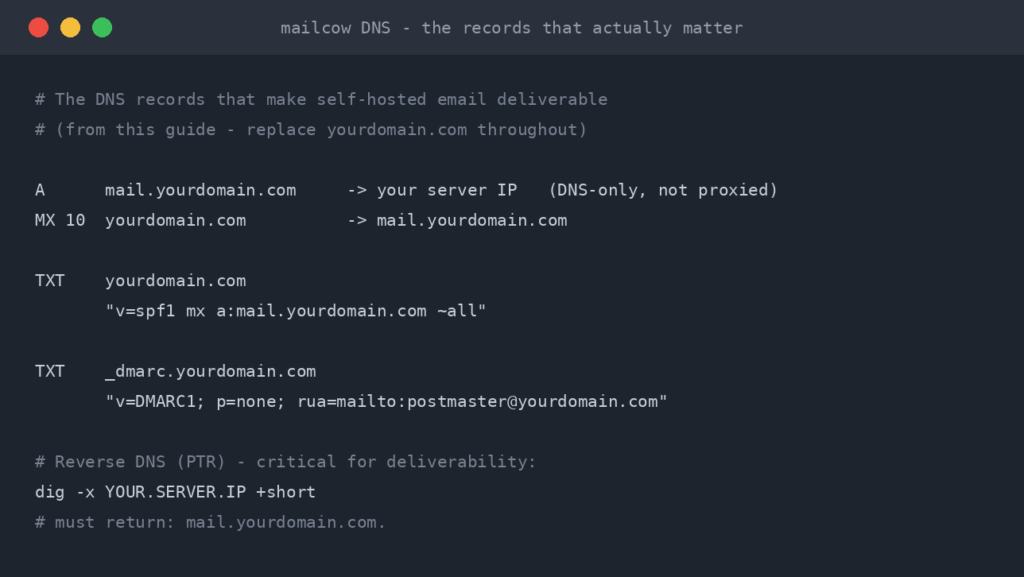
The Minimum Viable Mail Server
# Mailcow on a VPS

# 1. Get a VPS with at least 2GB RAM
# 2. Set up DNS records:
#    A record: mail.yourdomain.com -> your.ip
#    MX record: yourdomain.com -> mail.yourdomain.com
#    Reverse DNS: your.ip -> mail.yourdomain.com

# 3. Install Docker and Docker Compose

# 4. Clone Mailcow
git clone https://github.com/mailcow/mailcow-dockerized.git
cd mailcow-dockerized

# 5. Configure
./generate_config.sh
# Enter your domain, timezone

# 6. Start
docker compose up -d

# 7. Configure SPF, DKIM, DMARC (see Mailcow docs)
Critical DNS Records
SPF (Who can send for your domain):
v=spf1 mx -allDKIM (Digital signature):
Generated by your mail server – add to DNS
DMARC (Policy for failures):
v=DMARC1; p=quarantine; rua=mailto:[email protected]The Middle Path
Most readers should consider this path:
Use Your Own Domain
Even with a hosted provider:
- Buy a domain (~$12/year)
- Use it with Fastmail, ProtonMail, or even Google Workspace
- If provider changes/fails, move to another
- Your address stays the same forever
This gives you portability without the maintenance burden.
Tier Your Email Usage
Different addresses for different purposes:
Primary (Own domain, private provider):
- Important accounts
- Financial communications
- Professional correspondence
- Anything you’d miss if lost
Secondary (Privacy-focused provider):
- Sensitive communications
- Accounts where privacy matters
- Newsletter signups you care about
Throwaway (Free provider):
- Marketing signups
- One-time verifications
- Anything you don’t trust
Privacy Considerations
What Free Providers Do
Gmail’s privacy policy allows:
- Scanning email content
- Building advertising profiles
- Training AI models
- Sharing data with partners
This isn’t secret – it’s in the ToS you agreed to.
What Privacy Providers Do
ProtonMail’s approach:
- End-to-end encryption (between ProtonMail users)
- Zero-access encryption (they can’t read your mail)
- Swiss privacy laws
- No advertising business model
What Self-Hosting Does
Your own server:
- No third party sees content
- No profiling or advertising
- Full control over retention
- Full responsibility for security
Practical Recommendations
For Most People
- Get your own domain (~$12/year)
- Use a privacy-focused provider (ProtonMail, Fastmail)
- Keep a backup export of your email regularly
- Use different addresses for different purposes
For Tech-Savvy Users Who Want Control
- Own domain + Mailcow on a VPS
- Backup everything – email is critical
- Monitor deliverability – check spam placement
- Have a fallback – secondary address for critical things
For Everyone
- Don’t use free email for critical accounts
- Export your email regularly
- Own your address (your domain, not @gmail.com)
- Understand the tradeoffs you’re making
The Email Backup Strategy
Whatever you choose, back up your email:
IMAP Backup
# Using imapsync to backup to local Maildir
imapsync \
  --host1 imap.provider.com --user1 [email protected] --password1 "xxx" \
  --host2 localhost --user2 backup --password2 "yyy"

# Or to local files with offlineimap
# Configure ~/.offlineimaprc and run:
offlineimap
Export Options
- Gmail: Google Takeout (MBOX format)
- ProtonMail: Export feature in settings
- Self-hosted: Direct access to Maildir/mbox
Frequency
- Critical accounts: Weekly automated backup
- Regular accounts: Monthly export
- Store exports encrypted, offsite
Interview Questions (Self-Assessment)
Q1: “What happens to your accounts if your email provider bans you?”
If you can’t answer this, you have a single point of failure.
Q2: “Who can read your email?”
- Gmail: Google (for advertising, AI training)
- ProtonMail: No one (if to other ProtonMail users)
- Self-hosted: You only
Q3: “Could you switch providers within a week?”
- Using @gmail.com: No – you’d lose the address
- Using @yourdomain.com: Yes – just change MX records
The Career Connection
Understanding email infrastructure deeply – from MX records to DMARC policies – is enterprise-grade knowledge. Most IT professionals interact with email as users; those who understand the full stack stand out.
Skills demonstrated:
- DNS management and record types
- Email authentication protocols (SPF, DKIM, DMARC)
- Mail server architecture and components
- Security and encryption considerations
- Backup and disaster recovery planning
Interview talking points:
- Troubleshooting email deliverability issues
- Implementing email security policies
- Migrating email systems between providers
- Compliance and data retention requirements
The Bottom Line
Email is too important to leave to chance.
Minimum recommendation:
- Use your own domain
- Use a reputable paid provider
- Keep regular backups
Better:
- Privacy-focused provider
- Separate addresses for purposes
- Regular export routine
Maximum control:
- Self-hosted with proper maintenance
- Full backup strategy
- Understand you’re taking on responsibility
The goal isn’t email purity. It’s appropriate risk management for critical infrastructure.
Your email is your digital identity. Treat it accordingly.
Continue the Series
Action: Buy your own domain this week, even if you don’t use it yet
Your email address is your digital identity. The question isn’t whether to take it seriously – it’s how seriously.
This guide is part of the Homelab Guides series. See the full series for more guides like this.
Frequently Asked Questions
Why does your email provider matter for privacy?
Your email provider has full access to your messages, contacts, and metadata. Free providers like Gmail scan content for advertising, comply with broad government requests, and can lock you out without appeal. Your email is your digital identity tied to banking, services, and communications. The provider you choose determines who else can read it.
Should I self-host my own email server?
For most people, no. Self-hosted email requires managing deliverability (SPF, DKIM, DMARC, IP reputation), security patching, spam filtering, and 24/7 uptime. A single misconfiguration can mean your emails go straight to spam. A privacy-focused provider like ProtonMail or Fastmail with your own domain gives you sovereignty without the operational burden.
What is the best email provider for privacy in 2026?
ProtonMail offers end-to-end encryption and is based in Switzerland with strong privacy laws. Tutanota (now Tuta) is a German alternative with similar encryption. Fastmail (Australia) does not encrypt at rest but supports custom domains and is very reliable. For most people, ProtonMail with a custom domain is the best balance of privacy and usability.
What is email sovereignty and why does it matter?
Email sovereignty means controlling your email infrastructure so no single provider can lock you out, read your messages, or delete your account. Using your own domain ([email protected] instead of [email protected]) is the first step as it lets you switch providers without losing your address. Full sovereignty means self-hosting, but domain ownership gets you 80% of the benefit.
How do I move away from Gmail without losing everything?
First, register your own domain and set up email forwarding or a new mailbox with a privacy-focused provider. Update important accounts (banking, government, work) to your new address gradually. Set up Gmail forwarding to your new address so nothing is missed. Use Google Takeout to export your existing emails. The migration typically takes 2-3 months of running both in parallel.
 RTFM tees & hoodies
Read the manual. Wear the manual.
Tees £19.99 · Hoodies £39.99 · 10% off any 2+ · Free UK shipping over £50
RTFM tees & hoodies
Read the manual. Wear the manual.
Tees £19.99 · Hoodies £39.99 · 10% off any 2+ · Free UK shipping over £50

ReadTheManual is run, written and curated by Eric Lonsdale.
Eric has over 20 years of professional experience in IT infrastructure, cloud architecture, and cybersecurity, but started with PCs long before that.
He built his first machine from parts bought off tables at the local college campus, hoping they worked. He learned on BBC Micros and Atari units in the early 90s, and has built almost every PC he’s used between 1995 and now.
From helpdesk to infrastructure architect, Eric has worked across enterprise datacentres, Azure environments, and security operations. He’s managed teams, trained engineers, and spent two decades solving the problems this site teaches you to solve.
ReadTheManual exists because Eric believes the best way to learn IT is to build things, break things, and actually read the manual. Every guide on this site runs on infrastructure he owns and maintains.
Enjoyed this guide?
New articles on Linux, homelab, cloud, and automation every 2 days. No spam, unsubscribe anytime.