Can you upgrade PBS 3 to 4 in place? (Short answer)
Yes, and if your backup server still runs Proxmox Backup Server 3, do it now: PBS 3 reached end of life in August 2026. Update to the latest 3.4, run pbs3to4 --full, point every Debian and Proxmox repository at Trixie, run apt dist-upgrade, reboot, then verify and test a restore.
Tested in the ReadTheManual lab: a 3.4.9 server went to 4.2.8 with its datastore and backups intact, and the dist-upgrade itself ran for just over four minutes. The step that catches people is the repositories: Debian lines hiding in a .sources file that the wiki's one-line sed does not touch, and an enterprise repository that returns 401 Unauthorized on Trixie if you have no subscription.
Last updated: 16 October 2026. Commands checked October 2026 against the official upgrade wiki and the live Proxmox repositories (latest: 3.4.9-2 on Bookworm, 4.2.8-1 on Trixie).
Pre-Flight Check Script (Run This First)
Before touching anything, run this checks-only script on the server. On a Proxmox Backup Server it checks disk headroom (10 GB on /, as Proxmox ask), repo sanity, pending updates, configured datastores and ZFS pool health, then runs the official pbs3to4 --full checker. It changes nothing. (On a Proxmox VE node the same script runs the guest, quorum and vzdump checks and pve8to9 --full instead.)
Show the full script (copy-paste ready)
#!/usr/bin/env bash
# proxmox-upgrade-preflight.sh (ReadTheManual.co.uk)
# Pre-flight checks before an in-place Proxmox VE or PBS major upgrade.
# READ THE FULL UPGRADE GUIDE FIRST. This script only checks; it changes nothing.
# Run as root on the node you plan to upgrade:  bash proxmox-upgrade-preflight.sh
set -u
pass=0; warn=0; fail=0
ok(){   echo "  [PASS] $1"; pass=$((pass+1)); }
wrn(){  echo "  [WARN] $1"; warn=$((warn+1)); }
bad(){  echo "  [FAIL] $1"; fail=$((fail+1)); }

echo "== Proxmox upgrade pre-flight (checks only, no changes) =="

# 1. root?
[ "$(id -u)" = "0" ] && ok "running as root" || bad "not root: run with sudo/root"

# 2. which product + version
if command -v pveversion >/dev/null 2>&1; then
  v=$(pveversion | head -1); ok "Proxmox VE detected: $v"
elif command -v proxmox-backup-manager >/dev/null 2>&1; then
  v=$(proxmox-backup-manager versions 2>/dev/null | head -1); ok "PBS detected: $v"
else
  bad "neither pveversion nor proxmox-backup-manager found: is this a Proxmox node?"
fi

# 3. disk space (Proxmox ask for 10 GB free on / for a major upgrade)
for m in / /var; do
  availk=$(df -Pk "$m" 2>/dev/null | awk 'NR==2{print $4}')
  if [ -n "${availk:-}" ]; then
    availg=$((availk/1024/1024))
    if [ "$availk" -ge $((10*1024*1024)) ]; then ok "$m has ${availg}G free";
    elif [ "$availk" -ge $((2*1024*1024)) ]; then wrn "$m has only ${availg}G free: 10G+ recommended";
    else bad "$m has ${availg}G free: clear space before upgrading"; fi
  fi
done

# 4. repo sanity: enterprise repo without a subscription will 401 mid-upgrade
if grep -rqs "enterprise.proxmox.com" /etc/apt/sources.list /etc/apt/sources.list.d/ 2>/dev/null; then
  wrn "enterprise repo configured: fine WITH a subscription; otherwise switch to no-subscription first"
else
  ok "no enterprise repo configured (no-subscription path)"
fi

# 5. pending updates on the CURRENT release first (uses the cached index: run apt update first)
if apt-get -s dist-upgrade 2>/dev/null | grep -q "^Inst"; then
  wrn "pending updates on current release: fully update BEFORE the major upgrade"
else
  ok "current release fully updated"
fi

# 6. running guests (VE only): plan a window
if command -v qm >/dev/null 2>&1; then
  running=$(qm list 2>/dev/null | awk 'NR>1 && $3=="running"' | wc -l)
  ct=$(pct list 2>/dev/null | awk 'NR>1 && $2=="running"' | wc -l)
  [ "$((running+ct))" -gt 0 ] && wrn "$((running+ct)) guest(s) running: schedule a window or migrate first" || ok "no running guests"
fi

# 7. cluster quorum (VE clusters)
if command -v pvecm >/dev/null 2>&1 && pvecm status >/dev/null 2>&1; then
  pvecm status | grep -qi "quorate.*yes" && ok "cluster is quorate" || bad "cluster NOT quorate: do not upgrade"
fi

# 8. recent backup evidence (VE only: vzdump logs exist on PVE nodes, not on PBS)
if command -v vzdump >/dev/null 2>&1; then
  newest=$(find /var/log/vzdump -type f -mtime -7 2>/dev/null | head -1)
  if [ -n "${newest:-}" ]; then ok "vzdump activity within 7 days"; else wrn "no vzdump logs in the last 7 days: take/verify backups first"; fi
fi

# 9. PBS only: datastores and ZFS pools healthy
if command -v proxmox-backup-manager >/dev/null 2>&1 && ! command -v pveversion >/dev/null 2>&1; then
  ds=$(proxmox-backup-manager datastore list --output-format json 2>/dev/null | grep -o '"name"' | wc -l)
  [ "$ds" -gt 0 ] && ok "$ds datastore(s) configured" || wrn "no datastores listed: check proxmox-backup-manager datastore list"
  if command -v zpool >/dev/null 2>&1; then
    zpool status -x 2>/dev/null | grep -q "all pools are healthy\|no pools available" && ok "zpool status -x clean" || bad "a ZFS pool is not healthy: fix before upgrading"
  fi
fi

# 10. the official checker for this product (read its output in full)
if command -v pve8to9 >/dev/null 2>&1; then
  echo ""; echo "== pve8to9 --full =="; pve8to9 --full
elif command -v pbs3to4 >/dev/null 2>&1; then
  echo ""; echo "== pbs3to4 --full =="; pbs3to4 --full
else
  wrn "official checker (pve8to9 / pbs3to4) not found: update to the latest 8.4 / 3.4 first"
fi

echo ""
echo "== Result: $pass pass, $warn warn, $fail fail =="
[ "$fail" -gt 0 ] && echo "Fix every FAIL before upgrading. Read the guide for each WARN." || echo "No hard failures. Read the WARNs, take a fresh backup, then follow the guide."
More homelab tools like this in the RTM Toolbox.
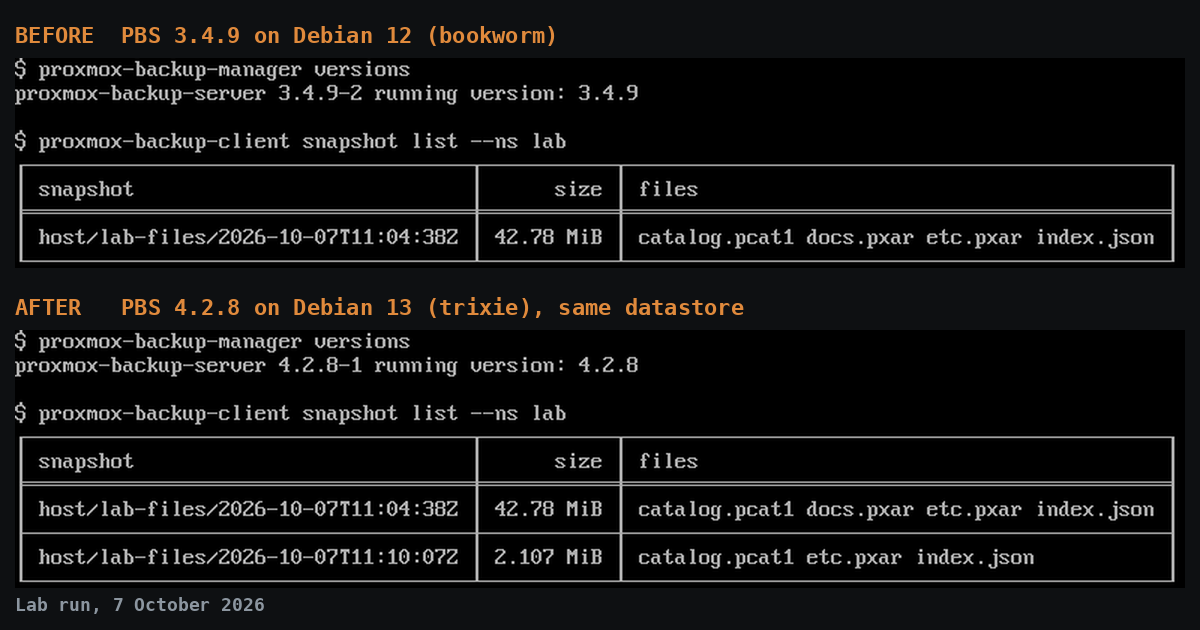
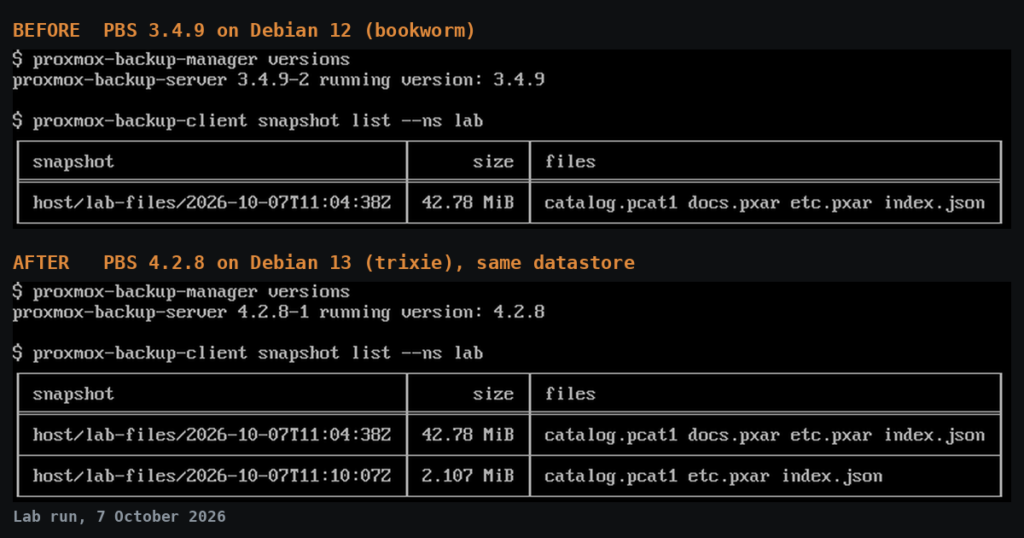
Tested: we ran this upgrade in the ReadTheManual lab on 7 October 2026, taking Proxmox Backup Server 3.4.9 to 4.2.8 (Debian 12 to 13). The existing backups came through, passed a full verify and restored, and a new backup ran afterwards. The output in the code blocks below is from that run, trimmed for length. The lab server had PBS installed on top of Debian rather than from the ISO; where that changes what you will see, the steps say so.
Why upgrade PBS 3 now?
Because it is out of support. The Proxmox Backup Server FAQ lists PBS 3 (Debian 12) end of life as August 2026, a month after Debian 12's own end of life. On 16 October 2026 a PBS 3 server is running without security fixes, and it is the machine that holds a copy of everything else you own. PBS 4.2, released on 29 April 2026, is the current line: Debian 13.4, kernel 7.0 as the default, and S3-compatible object storage as a fully supported datastore backend.
The upgrade itself is routine. What turns it into a long evening is a repository that half-switched, so apt mixes two Debian releases, or an error mid-upgrade that looks fatal and is not. If your PBS runs as a VM, take a snapshot first, or better, rehearse on a clone. Our whole run, from a fresh VM to a verified PBS 4 with a test restore, took about nine minutes. That is cheaper than finding out on the box that holds every backup you have.
What do you need before you start?
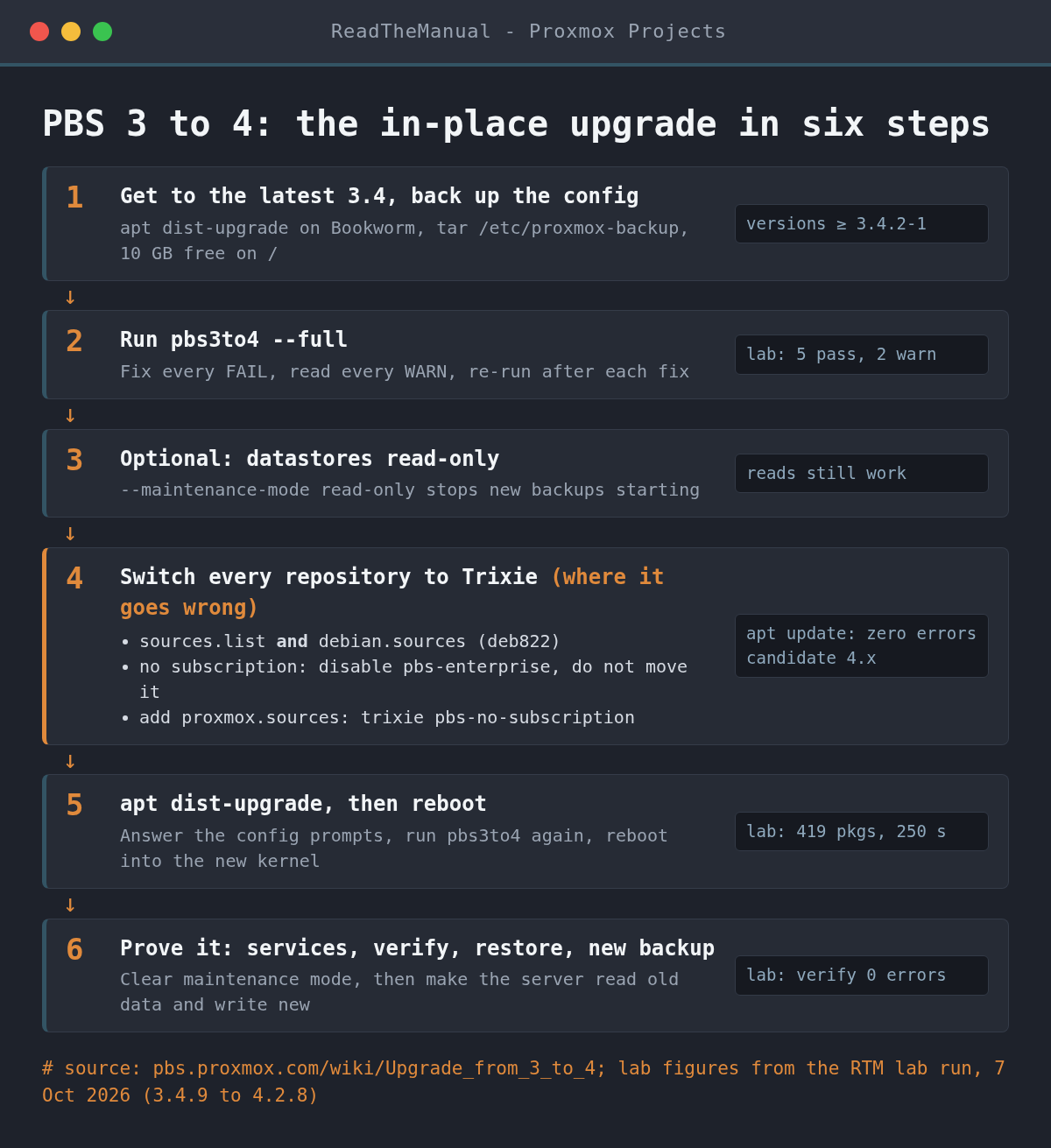
A tested backup, the latest 3.4, a copy of the config, 10 GB of free space and a session that will not drop. The full pre-flight checklist:
- A tested backup of whatever matters on this box. Proxmox require one before you start. For a PBS server that means a sync of your datastore to a second PBS or an offsite target, not just the config.
- The latest 3.4.
proxmox-backup-manager versionsmust report 3.4.2-1 or newer. The current 3.4 is 3.4.9-2. Ifpbs3to4sayscommand not found, this is why: the checker ships in the late 3.4 packages, so runapt update && apt dist-upgradeon Bookworm first. - A copy of the PBS configuration, off the server:
tar czf "pbs3-etc-backup-$(date -I).tar.gz" -C "/etc" "proxmox-backup". Ours was 4.4K. - At least 10 GB free on
/(df -h /). - A session that survives a dropped connection: SSH inside
tmuxorscreen, or a physical or IPMI console. The wiki says not to run the upgrade from the web UI's shell, which is interrupted during the upgrade. - Console access if the network does not come back. The new kernel can rename network interfaces (see the errors section).
- PVE and PBS on the same host? Read the Proxmox VE 8 to 9 guide too. The wiki says you can upgrade both in one go by changing the repositories for both at the same step.
Step 1: run the pbs3to4 checklist
Run the full check at least once before you change anything, and again after each fix:
pbs3to4 --fullOur output on 3.4.9, trimmed to the results:
WARN: updates for the following packages are available:
      shim-helpers-amd64-signed, grub-efi-amd64-signed, shim-signed, shim-signed-common, shim-unsigned
PASS: 'proxmox-backup' has version >= 3.4.0
PASS: running kernel '6.8.12-43-pve' is considered suitable for upgrade.
PASS: systemd unit 'proxmox-backup.service' is in state 'active'
PASS: systemd unit 'proxmox-backup-proxy.service' is in state 'active'
WARN: systemd-timesyncd is not the best choice for time-keeping on servers, due to only applying updates on boot.
PASS: found no suite mismatch
SKIP: System booted in legacy-mode - no need for additional packages.

TOTAL:     9
PASSED:    5
SKIPPED:   2
WARNINGS:  2
Two warnings, no failures. The first is pending Bookworm updates: install them (apt dist-upgrade) before you go on. The second recommends chrony over systemd-timesyncd. It does not block the upgrade, but it is a one-line fix while you are there: apt install chrony, which replaces timesyncd.
If pbs3to4 mentions the systemd-boot meta-package, follow it. The wiki says that package (shipped on systems installed from the PBS 3.0 to 3.4 ISOs) should be removed unless you set up systemd-boot yourself, and the checker tells you when.
Step 2 (optional): put the datastores in read-only maintenance mode
This stops new backups from starting mid-upgrade, while existing ones stay readable, and it cuts the I/O load so the upgrade runs faster. Do it for each datastore:
proxmox-backup-manager datastore update labstore --maintenance-mode read-only
│ maintenance-mode │ read-only         │
Replace labstore with your datastore ID. You turn it off again in Step 6. The same switch is in the web UI under each datastore's Options tab.
Step 3: which repositories need to change for Trixie?
All of them, and this is the step that goes wrong. Most searches that land on this page are about it, and it is where most upgrades go wrong. The rule: when you finish, apt update must run with zero errors and no file in /etc/apt/ may still enable a Bookworm line.
The Debian repositories: check .sources files as well as sources.list
The wiki's command is:
sed -i 's/bookworm/trixie/g' /etc/apt/sources.listOn our server it ran without an error and changed nothing that mattered. The Debian repositories were in the newer deb822 format, in /etc/apt/sources.list.d/debian.sources, which that command never touches. The wiki does tell you to check every file in sources.list.d, so do it with a grep rather than by eye:
grep -rn bookworm /etc/apt/sources.list /etc/apt/sources.list.d/
/etc/apt/sources.list.d/debian.sources:3:Suites: bookworm bookworm-updates bookworm-backports
/etc/apt/sources.list.d/debian.sources:9:Suites: bookworm-security
/etc/apt/sources.list.d/pbs-install-repo.list:1:deb http://download.proxmox.com/debian/pbs bookworm pbs-no-subscription
/etc/apt/sources.list.d/pbs-enterprise.list:1:# deb https://enterprise.proxmox.com/debian/pbs bookworm pbs-enterprise
A server installed from the PBS ISO usually keeps its Debian lines in sources.list, so the wiki's sed covers it. One installed on top of Debian (a cloud image, a VPS template) is more likely to have debian.sources, as ours did. If it shows up, switch it too:
sed -i 's/bookworm/trixie/g' /etc/apt/sources.list.d/debian.sourcesLeave the Proxmox lines alone for now. They are handled next.
No subscription? Disable the enterprise repository, do not move it to Trixie
A PBS install adds an enterprise repository file, pbs-enterprise.list, whether or not you have a subscription. The wiki's first repository command writes that enterprise repository for Trixie, and the no-subscription one comes after it. Do both without a subscription and you get this:
Err:8 https://enterprise.proxmox.com/debian/pbs trixie InRelease
  401  Unauthorized
E: Failed to fetch https://enterprise.proxmox.com/debian/pbs/dists/trixie/InRelease  401  Unauthorized
That error is what you get if you switch every file still saying bookworm, the enterprise one included. On the no-subscription path, comment the enterprise line out instead (in a .sources file, add Enabled: no to the stanza):
sed -i 's/^deb/# deb/' /etc/apt/sources.list.d/pbs-enterprise.listWith a subscription, follow the wiki: create /etc/apt/sources.list.d/pbs-enterprise.sources with Suites: trixie and Components: pbs-enterprise, check it with apt update and apt policy, then remove the old pbs-enterprise.list.
Add the PBS 4 no-subscription repository
This is the wiki's file, verbatim. Then remove the old Bookworm Proxmox line (ours was in pbs-install-repo.list; on an ISO install it may be in sources.list):
cat > /etc/apt/sources.list.d/proxmox.sources << EOF
Types: deb
URIs: http://download.proxmox.com/debian/pbs
Suites: trixie
Components: pbs-no-subscription
Signed-By: /usr/share/keyrings/proxmox-archive-keyring.gpg
EOF
rm /etc/apt/sources.list.d/pbs-install-repo.list
That Signed-By line expects a keyring file. On 3.4.9 it was already there, shipped by the proxmox-archive-keyring package (version 3.3):
ls -l /usr/share/keyrings/ | grep -i proxmox
-rw-r--r-- 1 root root  3559 Jul  9  2025 proxmox-archive-keyring.gpg
...
ii  proxmox-archive-keyring 3.3          all          Proxmox APT archive keyring
If yours is missing, the PBS documentation fetches it with:
wget https://enterprise.proxmox.com/debian/proxmox-archive-keyring-trixie.gpg -O /usr/share/keyrings/proxmox-archive-keyring.gpgCheck apt can see PBS 4 before you upgrade anything
grep -rn bookworm /etc/apt/sources.list /etc/apt/sources.list.d/
apt update
apt policy proxmox-backup-server
proxmox-backup-server:
  Installed: 3.4.9-2
  Candidate: 4.2.8-1
The grep should only find commented-out lines, and apt update must finish with no errors. If the candidate still says 3.4, a Proxmox repository is still on Bookworm.
Step 4: run the upgrade
apt dist-upgradeOurs unpacked 419 packages in 250 seconds on SSD-backed storage. Proxmox say a slow spinning disk can take 60 minutes or more. Expect questions while it runs:
/etc/issue: keep your current version. PBS regenerates it at boot./etc/ssh/sshd_config: if you never edited it, the only real change isChallengeResponseAuthentication nobecomingKbdInteractiveAuthentication no, and the wiki recommends taking the maintainer's version. If you did edit it, look at the difference first./etc/default/grub: only asked if you changed it. Check the difference; if unsure, keep yours.- Restart services without asking? Take the default. The reboot restarts everything cleanly anyway.
An error that looks fatal and was not. Near the end, our upgrade printed this:
Setting up proxmox-backup-server (4.2.8-1) ...
Failed to restart postfix.service: Transaction contains conflicting jobs 'restart' and 'stop' for [email protected]. Probably contradicting requirement dependencies configured.
Could not execute systemctl:  at /usr/bin/deb-systemd-invoke line 148.
apt still finished successfully, and the PBS services came up clean after the reboot. If PBS sends your notifications through the local Postfix, check systemctl status postfix once you have rebooted; mail delivery was not part of the lab run.
Step 5: check pbs3to4 again, then reboot
Running pbs3to4 now should say you are on 4.x, plus one warning you should expect:
PASS: Already upgraded to 4.2
WARN: a suitable kernel 'proxmox-kernel-7.0' is installed, but an unsuitable '6.8.12-43-pve' is booted, missing reboot?!
That warning is the cue to reboot into the new kernel:
systemctl rebootStep 6: how do you check the upgrade worked?
First, what is running:
grep PRETTY /etc/os-release; uname -r; proxmox-backup-manager versions
PRETTY_NAME="Debian GNU/Linux 13 (trixie)"
7.0.14-22-pve
proxmox-backup-server 4.2.8-1 running version: 4.2.8

systemctl status proxmox-backup-proxy.service proxmox-backup.service
● proxmox-backup-proxy.service - Proxmox Backup API Proxy Server
     Active: active (running)
● proxmox-backup.service - Proxmox Backup API Server
     Active: active (running)
Take each datastore out of maintenance mode if you used Step 2:
proxmox-backup-manager datastore update labstore --delete maintenance-modeThen make the upgraded server prove it can still read what it wrote before the upgrade. A verify reads every chunk and checks it:
proxmox-backup-manager verify labstore --ignore-verified false
found 1 groups
verify group labstore:host/lab-files (1 snapshots)
  check etc.pxar.didx
  verified 0.53/1.99 MiB in 0.01 seconds, speed 95.92/356.74 MiB/s (0 errors)
  check docs.pxar.didx
  verified 24.39/40.71 MiB in 0.07 seconds, speed 346.70/578.56 MiB/s (0 errors)
percentage done: 100.00% (1/1 snapshots)
TASK OK
On a datastore of several terabytes a full verify takes hours, so start it and let it run, or verify a handful of recent snapshots from the web UI first. A verify is not a restore, so restore something too. Our pre-upgrade snapshot came back with its Debian 12 files, Bookworm repository lines and all:
proxmox-backup-client restore --ns lab host/lab-files etc.pxar /tmp/restore
restore complete (1.986 MiB processed in <0.1s, average 53 MiB/s)
cat /tmp/restore/debian_version
12.15
Last, take a new backup so you know the write path works on 4.x as well. In the lab that was a client backup; on a real setup, run one of your Proxmox VE backup jobs by hand:
proxmox-backup-client backup etc.pxar:/etc --ns lab --backup-id lab-files
etc.pxar: had to backup 2.079 MiB of 2.079 MiB (compressed 541.549 KiB) in 0.14 s (average 14.788 MiB/s)
Duration: 0.28s
Force-reload the web interface (Ctrl+Shift+R, or Cmd+Alt+R on a Mac) so the browser does not serve the old interface from its cache. Optionally, convert any remaining one-line .list files to the deb822 format with apt modernize-sources: answer n the first time to see what it would change. It keeps the old files as .list.bak.
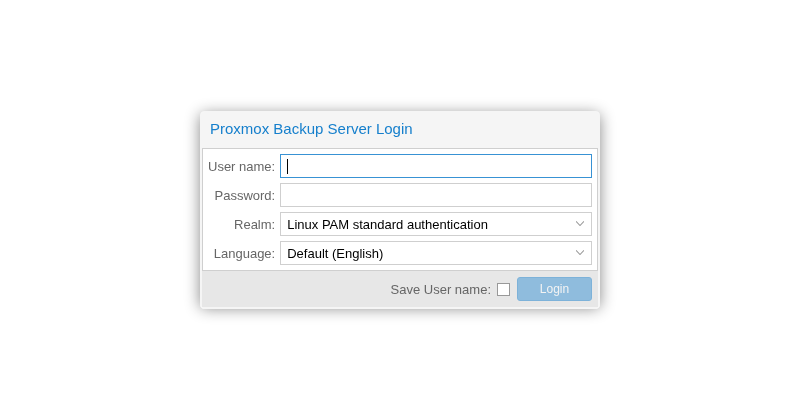
Can you roll back a PBS 4 upgrade?
Not in place. There is no supported downgrade from Debian 13 to 12, so plan the way back before you start:
- PBS in a VM: the snapshot you took before Step 1 is your rollback. Roll back and you are on 3.4 again, minus any backups written after the snapshot (another reason for read-only maintenance mode).
- Bare metal: the fallback is a fresh install. Install PBS, restore
/etc/proxmox-backupfrom the tarball you took in the pre-flight checklist, and your users, jobs and datastore definitions return. Datastores on their own disks are not touched by the OS upgrade, but re-attaching them is the step to rehearse on a spare box first. We did not run this path in the lab. - Fix forward when you can. PBS 3 is out of support, so going back buys time, not a destination. Most post-upgrade faults are in the table below and take minutes.
What are the common errors, and how do you fix them?
| Symptom | Cause | Fix |
|---|---|---|
pbs3to4: command not found |
Not on the latest 3.4 | apt update && apt dist-upgrade on Bookworm, then run it |
FAIL: could not match the 'proxmox-backup' package version |
Only proxmox-backup-server installed on Debian, running the Debian kernel |
apt install proxmox-backup, reboot into the Proxmox kernel |
401 Unauthorized from enterprise.proxmox.com |
Enterprise repo enabled without a subscription | Comment it out, or Enabled: no in a .sources file |
Candidate still 3.4, or pbs3to4 reports a suite mismatch |
A file still says bookworm | grep -rn bookworm /etc/apt/ and switch or disable each hit |
Failed to restart postfix.service during the upgrade |
Service restart clash mid-upgrade | Let apt finish, reboot, check systemctl status postfix |
| No network after the reboot | The new kernel renamed a NIC | Console in, compare ip link with /etc/network/interfaces; pin names beforehand with proxmox-network-interface-pinning |
| Backups fail straight after the upgrade | Datastore still read-only | --delete maintenance-mode as in Step 6 |
| Web UI blank or half-drawn | Old interface cached | Ctrl+Shift+R |
Two more from the PBS 4.0 release notes. If you use passkeys as a second factor, make sure you also have recovery codes or TOTP set up before you upgrade. And sync jobs that filter on encrypted-only or verified-only snapshots now apply that filter before the transfer-last cutoff, so check what a filtered sync job copies after the upgrade.
If the services will not start, journalctl -u proxmox-backup-proxy -b shows why. If the configuration is damaged, that is what the pbs3-etc-backup tarball is for.
FAQ
How long does the PBS 3 to 4 upgrade take?
In our lab the apt dist-upgrade took 250 seconds for 419 packages on SSD-backed storage, and the whole job, checks and reboot included, took under ten minutes. Proxmox say a slow spinning disk can take an hour or more, and a full verify of a large datastore afterwards takes longer than the upgrade.
Is PBS 3 still supported?
No. The Proxmox Backup Server FAQ gives PBS 3 an end of life of August 2026. Upgrade to 4.
Do I need a subscription to upgrade?
No. Use the pbs-no-subscription repository shown above, and disable the enterprise repository, or apt update fails with 401 Unauthorized.
Will my datastores and backups survive?
In the lab test, yes: the datastore, namespace and pre-upgrade snapshot came through, passed a full verify and restored correctly. Proxmox still require a tested backup before you start, and so do we.
Can I go straight from PBS 2 to 4?
No. The wiki starts from the latest 3.4, so upgrade 2 to 3 first, get to the latest 3.4, then follow this guide.
Career Context: A major-version upgrade of the backup tier, with a written pre-flight, a read-only window, and a verify plus a test restore as the exit criteria, is a change record you can put in front of an interviewer. “I upgraded it and it worked” is not; “here is how I proved the backups still restored” is.

RTFM Apparel · printed in the UK

Sources
- Proxmox wiki: Upgrade from 3 to 4 (last edited 19 September 2025)
- Proxmox Backup Server documentation: Debian package repositories
- Proxmox Backup Server documentation: FAQ, support lifecycle
- Proxmox wiki: Proxmox Backup Server roadmap and known issues
- Package versions read from the Proxmox no-subscription repositories on 16 October 2026: 3.4.9-2 (Bookworm), 4.2.8-1 (Trixie)

ReadTheManual is run, written and curated by Eric Lonsdale.
Eric has over 20 years of professional experience in IT infrastructure, cloud architecture, and cybersecurity, but started with PCs long before that.
He built his first machine from parts bought off tables at the local college campus, hoping they worked. He learned on BBC Micros and Atari units in the early 90s, and has built almost every PC he’s used between 1995 and now.
From helpdesk to infrastructure architect, Eric has worked across enterprise datacentres, Azure environments, and security operations. He’s managed teams, trained engineers, and spent two decades solving the problems this site teaches you to solve.
ReadTheManual exists because Eric believes the best way to learn IT is to build things, break things, and actually read the manual. Every guide on this site runs on infrastructure he owns and maintains.
Enjoyed this guide?
New articles on Linux, homelab, cloud, and automation every 2 days. No spam, unsubscribe anytime.