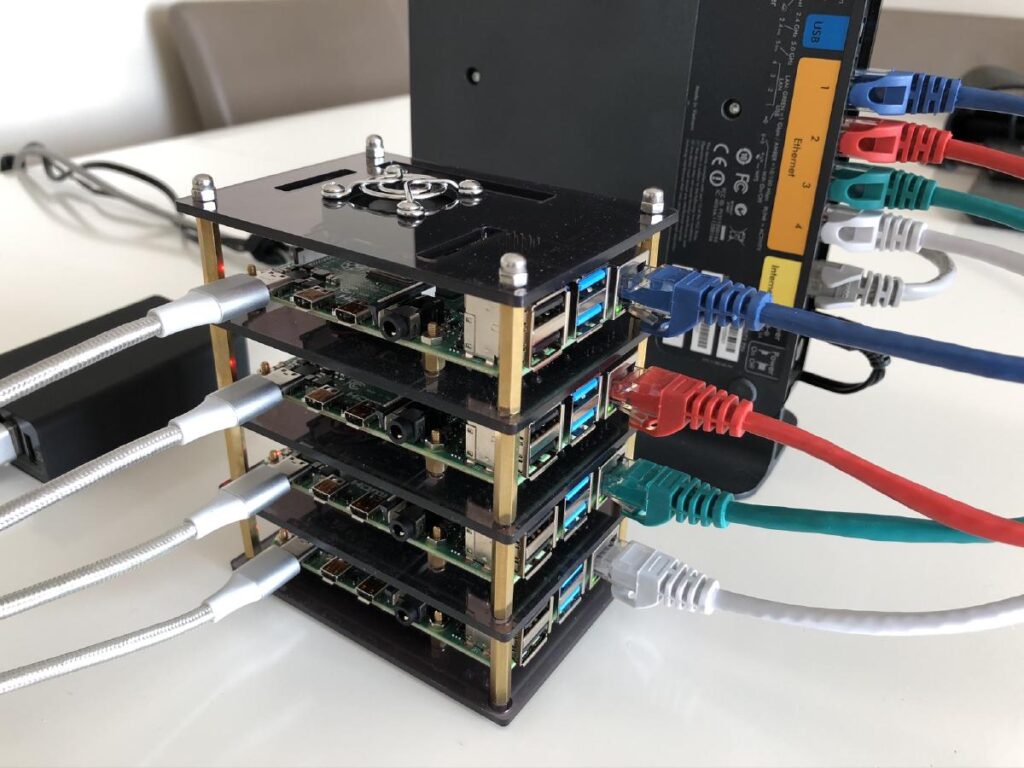
Below is the shopping / build sheet for the Raspberry Pi Cluster project
From the homelab: I built a Pi cluster for running lightweight services — monitoring, DNS, and a K3s Kubernetes playground. Here is the exact shopping list I used, with notes on what is worth spending on and where to save.
Some variables are available (between pi4/ pi5) memory size, style etc – NOT EVERY ITEM BELOW MAY BE NEEDED TO COMPLETE THE BUILD
If you have any parts lying around- feel free to substitute to make things work
4 Node Raspberry Pi Cluster Case

Alternative Cluster Case

RaspBerry Pi

Buy From Amazon (UK) – Pi 5 (8gb)
Buy from Amazon (US) – pi 5 (8gb)
Buy From Amazon (UK) – Pi 4 (8gb)
Buy From Amazon (US) – Pi 4 (8gb)
Raspberry Pi HeatSink Set (Pi 4)

32GB USB ThumbDrives

Unifi Mini Flex Switch

Buy From Amazon (US) – TPLink unmanaged 1gb switch
USB C Power Cables

Power Bank (for powering PI4 Devices)

KVM (Remote Keyboard / Monitor Access)


Monitor Cable (pi to KVM)

Why a Pi Cluster?
A Pi cluster is not going to replace a proper server. But it is an excellent learning platform for distributed systems, Kubernetes, and service orchestration. I run mine alongside a Proxmox cluster — the Pis handle lightweight services while the mini PCs handle the heavy lifting.
It is also a brilliant talking point in interviews. “I run a Kubernetes cluster at home” opens conversations that “I completed a Udemy course” does not.
What I Would Change
If I were building again, I would skip the cluster HATs and use a simple shelf or 3D-printed rack instead. The stackable cases look neat but make it harder to access individual Pis for maintenance. I would also go straight to NVMe HATs for boot drives — SD cards are not reliable enough for always-on services.
Related Guides
If you found this useful, these guides continue the journey:
- Raspberry Pi 5 Homelab Guide — getting the most out of your Pi hardware
- Install Docker on Raspberry Pi — containerise your Pi services
- K3s Kubernetes on Pi 5 — turn your cluster into a Kubernetes playground
- Build Your First Homelab in 2026 — the bigger picture
RTFM Apparel · printed in the UK


ReadTheManual is run, written and curated by Eric Lonsdale.
Eric has over 20 years of professional experience in IT infrastructure, cloud architecture, and cybersecurity, but started with PCs long before that.
He built his first machine from parts bought off tables at the local college campus, hoping they worked. He learned on BBC Micros and Atari units in the early 90s, and has built almost every PC he’s used between 1995 and now.
From helpdesk to infrastructure architect, Eric has worked across enterprise datacentres, Azure environments, and security operations. He’s managed teams, trained engineers, and spent two decades solving the problems this site teaches you to solve.
ReadTheManual exists because Eric believes the best way to learn IT is to build things, break things, and actually read the manual. Every guide on this site runs on infrastructure he owns and maintains.
Enjoyed this guide?
New articles on Linux, homelab, cloud, and automation every 2 days. No spam, unsubscribe anytime.