Your homelab is not a hobby. It is a professional development environment.
I have been building, hiring into, and managing infrastructure teams for over 20 years. I have reviewed hundreds of CVs. The ones that stand out are not the ones with the longest list of certifications.
They are the ones where the candidate has clearly built something real.
A homelab is that something. But most people either leave it off their CV entirely or present it badly. Both are mistakes. Here is how to get it right.
Career Value: Infrastructure engineers with demonstrable homelab experience are increasingly preferred over certification-only candidates. This guide covers exactly how to present your homelab on your CV, what to say in interviews, and which projects map to which roles.

Why Hiring Managers Care About Your Homelab
Certifications prove you can pass an exam. A homelab proves you can build and maintain infrastructure.
Those are different skills.
When I used to interview engineers regularly, I always asked the same question: “So tell me about your homelab.”
Two reasons.
First, most good engineers have one. Their own personal test environment, their own playground. But in an interview they focus purely on “in my current role I just deal with SCCM” or whatever their day job covers. If they have a homelab, they are massively underselling themselves.
Second, and more importantly: I like seeing what engineers build with their own inspiration.
No corporate constraints. No JFDI deadlines. No budget approvals. It shows their creativity, their problem-solving, and it says something about them as an engineer. Especially if it is built on real hardware, or ewaste they have repurposed. That tells me this person genuinely cares about infrastructure, not just the paycheque.
What a homelab on a CV tells me
- They are self-motivated. Nobody made them do this. They chose to spend their own time building infrastructure because they find it interesting.
- They have troubleshooting experience. A homelab breaks. Regularly. At 2am. And they fix it themselves because there is no second-line to escalate to.
- They understand the full stack. In enterprise, you might only touch one layer. In a homelab, you do everything: hardware, networking, virtualisation, storage, services, security, monitoring, backup.
- They learn by doing. Reading documentation is one thing. Discovering that Docker networking does not work the way the documentation implies at 11pm on a Tuesday is something else entirely.
On the flip side, I have turned away engineers who told me “I do not have a laptop, I just have my phone and my work laptop.”
That tells me something too.
And I have had candidates, more than once, admit that they build things on their current employer’s hypervisor or cloud accounts without telling them. That is not initiative. That is a liability.

What NOT To Do
Before we get to the right way, here is what I see go wrong:
- Do not list it as a “hobby.” Under Hobbies and Interests, next to “cycling” and “cooking.” Your homelab is a professional development environment. Treat it like one.
- Do not just list technologies. “Docker, Proxmox, Grafana, Wazuh” tells me nothing. What did you build? What problem did you solve?
- Do not exaggerate the scale. “Enterprise-grade infrastructure” for three Raspberry Pis will make you look dishonest. Own the scale you operate at. A hiring manager who runs infrastructure for a living will see through inflation immediately.
- Do not include everything. 30 services sounds impressive until you realise the interviewer will ask about any of them. Only list what you can speak to confidently.
How To Present Your Homelab on Your CV
Weave it in, do not give it its own section
The temptation is to create a standalone “Personal Infrastructure Lab” section on your CV. Resist it. Sitting alongside your employment history, it looks like you are padding.
Unless you are running Jellyfin for your extended family with 99.995% uptime and an SLA, it is not a job.
Instead, integrate your homelab into the sections that already exist:
Your About / Profile section: A line like “I maintain a personal infrastructure lab running 15+ self-hosted services, which I use to test and validate technologies before deploying them professionally” immediately signals depth without looking like a separate role.
Your Skills section: List the technologies you run at home alongside the ones you use at work. Ansible is Ansible whether you learned it on your employer’s estate or your own Proxmox cluster.
Your role descriptions: This is the real power move. If you have used a technology in your homelab but not yet in a professional role, you can still reference the skill. “Experience with Wazuh SIEM for log correlation and threat detection” is a true statement. Where you gained that experience is a conversation for the interview, not a caveat on the CV.
Keep it relevant
I do not massively care that you are running Jellyfin, or a Plex server, or whatever else you use your homelab for in the evenings. The services themselves are not the point.
What I want to talk about is:
- What you are running them on
- How you are keeping them patched and available
- How you are monitoring them
- How you handle updates without downtime
- What happens when something breaks
The infrastructure underneath is the skill. The media server on top is just the reason you built it.
Stick to the technologies and practices that map to the role. Docker, Ansible, monitoring, backup strategy, network segmentation, security hardening. Those belong on a CV. Your Sonarr and Radarr configuration does not.

A real example
Here is how I would describe my own homelab on a CV:
“Clustered hypervisors running a mix of Linux and Windows servers. Automated patching, automated security monitoring via SIEM, automated CMDB for asset tracking. Zero trust private access across all sites. Multi-node Kubernetes cluster serving 15+ production websites. File server and Entra ID authentication across a hybrid domain.”
Every word of that is true. It also reads like a mid-size enterprise estate, not a hobby project.
Notice what is not in there: no mention of Jellyfin, no media libraries, no personal services. Because I assume everyone has a media server at home. They do, right? But that is not what gets you hired.
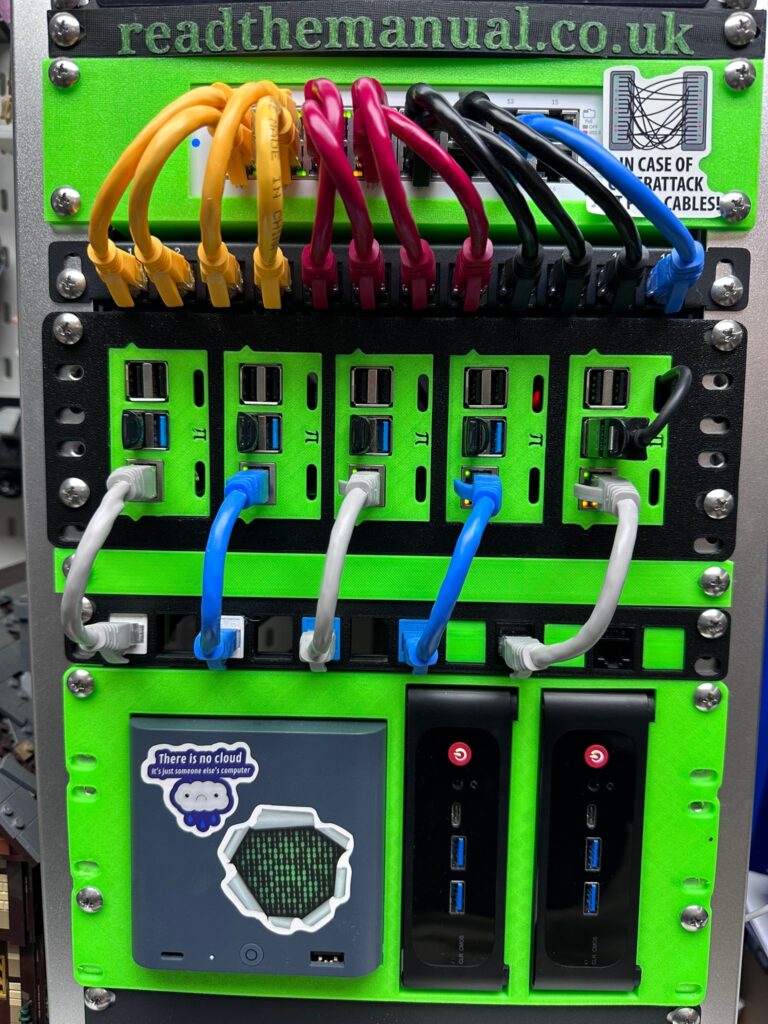
The fact that all of this runs on small, inexpensive hardware (mini PCs and Raspberry Pis, not racks of enterprise servers) is a detail I save for the interview. That is when it becomes impressive rather than underwhelming.
“All of that runs on hardware that cost less than a month’s rent” is a much better conversation in person than it is as a line on a CV.
It also reads like something unbelievable for a home setup. Good. That invites challenge, and challenge invites conversation. Because every question they ask about your homelab is a question where you are the expert, talking about something you built from scratch and know inside out.
As an infrastructure architect, I lean into this. My job is to design enterprise solutions. How would I do that credibly if I did not run my own infrastructure?
How do I draw the picture if I do not know how all the pieces actually fit together?
The homelab is not a side project I do despite being an architect. It is the reason I am a good one.
The Security Angle Nobody Mentions
Running your own infrastructure gets you into the right security habits.
When it is your server exposed to the internet, you pay attention to CVEs. When it is your data behind that firewall rule, you think harder about what you expose and how it is secured.
You learn to patch promptly because you have seen what happens when you do not. You think about TLS certificates, reverse proxy headers, authentication layers, and network segmentation not because a compliance framework told you to, but because you genuinely care about not getting compromised.
I used to run Nessus vulnerability scans on my homelab before I outgrew the free tier. Understanding what a vulnerability scanner actually finds, reading the results, triaging the risks, and fixing them is core to understanding what is going on in your network.
Nessus is free for up to 16 devices. OpenVAS is genuinely free with no device limit. You do not need an enterprise budget to run enterprise-grade security assessments on your own infrastructure.
The engineer who has actually read a vulnerability scan report and fixed what it found is infinitely more valuable than one who has only heard about them in a certification module.
Security awareness born from personal responsibility is far deeper than security awareness born from annual compliance training.

Quantify It Like a Project, Not a Shopping List
“Docker, Proxmox, Grafana, Wazuh” as a skills list tells me nothing. What did you build? What problem did you solve?
Weave in specifics wherever you reference homelab skills:
– Automated provisioning of 8 Linux servers using Ansible, reducing rebuild time from 4 hours to 20 minutes
– Deployed Wazuh SIEM with 12 data sources, detecting and remediating 3 real security misconfigurations
– Implemented 3-2-1 backup strategy with automated offsite replication to cloud storage
– Monitoring stack provides fleet visibility across all hosts with alerting for service degradation
Numbers matter. “Automated provisioning” is vague. “Reducing rebuild time from 4 hours to 20 minutes” is concrete.
Map Your Homelab to the Job Description
This is the step most people miss. Before you send the CV, read the job spec and adjust your homelab references to highlight the relevant parts.
- Applying for a DevOps role? Emphasise Ansible, Docker, CI/CD pipelines, infrastructure as code.
- Applying for a security role? Lead with Wazuh, CrowdSec, firewall rules, pentest results.
- Applying for a cloud role? Highlight the hybrid elements: Azure Arc, Terraform, VPN to cloud VPS.
- Applying for a sysadmin role? Focus on the breadth: networking, storage, backup, monitoring.
The homelab section is not static. Tailor it every time, just like you would tailor your professional experience bullets.
Homelab Projects That Map to Specific Roles
If you are building your homelab with career development in mind, here is what to prioritise:
| Target Role | Homelab Focus | What It Demonstrates |
|---|---|---|
| System Administrator | AD domain, Group Policy, DNS, DHCP, backup, monitoring | Core infrastructure management. Fundamentals that never go out of style. |
| DevOps Engineer | Docker, Kubernetes (K3s), CI/CD (Gitea + runners), Ansible, Terraform | Infrastructure as code, automation, deployment pipelines. |
| Cloud Engineer | Azure Arc, Terraform to Azure, hybrid identity (AD + Entra), VPN to cloud | Bridging on-prem and cloud. Understanding what the portal abstracts away. |
| Security Analyst | Wazuh SIEM, CrowdSec, OpenVAS scanning, firewall rules, incident response | Threat detection, log analysis, vulnerability management. A mini-SOC. |
| Network Engineer | VLANs, managed switches, VPN mesh, DNS, reverse proxy, WiFi | Real network design and troubleshooting, not just diagrams. |
| Site Reliability Engineer | Monitoring (Prometheus + Grafana), alerting, chaos testing, DR testing | Reliability engineering on real infrastructure with real uptime data. |
Pick the 3-4 that align with where you want to go and go deep. Depth beats breadth on a CV.
Not sure where to start? Our 2026 homelab build guide walks you through the hardware and setup. Get started for around £100 to £150 with a Raspberry Pi 5 or a second-hand mini PC. Our essential services guide covers what to run first.

How To Talk About Your Homelab in Interviews
The homelab on your CV is a conversation starter. The interview is where you prove the depth.
Expect these questions
“Tell me about your homelab.”
Have a 60-second summary ready. What it runs, why you built it, what you learned. Do not list every service. Pick the 2-3 most interesting things and explain them well.
“What was the hardest problem you solved?”
This is the gold question. Every homelab has a war story. The DNS issue that took 6 hours. The backup that did not actually restore. The Docker network that worked locally but not across VLANs.
“How does this relate to enterprise?”
This is your moment. “I run Wazuh at home. It is the same SIEM architecture as Sentinel or Splunk, just without the licensing cost. The skills transfer directly.”
“What would you do differently?”
Honest self-assessment shows maturity. “I started with a flat network because I wanted things working quickly. I have since segmented into VLANs because I realised the security implications.”
The killer angle
If you have ever tested a technology in your homelab before recommending or deploying it professionally, say so.
“We needed to evaluate Ansible for our server fleet. I had already been running it on my homelab for 6 months, so I knew the gotchas before we started the proof of concept.”
That sentence tells the interviewer you are proactive, thorough, and reduce risk for your employer. Those are senior engineer traits.
Certifications vs Homelab
This is not either/or. The best candidates have both.
Certifications validate knowledge against a vendor’s framework. A homelab validates that you can apply that knowledge to real infrastructure. They complement each other.
But if I had to pick one signal on a CV, I would take the homelab.
I have interviewed certified engineers who could not troubleshoot a DNS issue. I have never interviewed a serious homelabber who could not.
Our homelab to cloud architect guide explores this bridge in more detail.
The Career Progression a Homelab Enables
A homelab is not a one-time CV line. It grows with you.
| Career Stage | Homelab Focus | CV Impact |
|---|---|---|
| Breaking in | Linux basics, Docker, a few services | Differentiates you from every other candidate with just a CompTIA cert |
| Mid-level | Automation, monitoring, security, hybrid cloud | Demonstrates initiative and breadth beyond your current role |
| Senior | Multi-site, DR, compliance, cost analysis | Shows you think about systems holistically, not just individual components |
| Leadership | The fact that you still build things | Technical leaders who stay hands-on are rare and respected |
At senior level, the homelab demonstrates something certifications never can: that you still care enough to build things with your own hands.
If you are at the helpdesk stage, our guide on why starting on a helpdesk is the best first step in tech covers the foundation, and our transferable skills guide helps you frame what you already know.
Document As You Build
The single best thing you can do for your career is document your homelab publicly. A blog, a GitHub repo, even a series of LinkedIn posts.
Why?
Because a CV is a claim. A blog post is evidence.
“I automated my server provisioning with Ansible” on a CV is something you say. A blog post walking through your playbooks with real screenshots is something you can prove.
Give the interviewer a link. Let them see your thinking, your problem-solving, your writing.
It does not need to be polished. It does not need to be perfect. It needs to be real.
Want to go deeper on security? Our guide on how to secure your homelab network covers the fundamentals, and our 5 security basics every homelab needs gives you a quick-start checklist.
Next: The Training Pipeline Shut Off
This guide covered the practical side: how to present your homelab, what to say in interviews, and which projects map to which roles.
In Part 2: The Training Pipeline Shut Off, we cover why this matters more now than ever. Entry-level IT has changed. AI is replacing the basics. The barriers to learning have collapsed. And the engineers who keep building will be the ones who stay irreplaceable.
Eric Lonsdale has spent 20+ years in infrastructure, from racking servers to architecting cloud migrations. He runs ReadTheManual to bridge enterprise and homelab skills, because the training pipeline shut off but you do not need anyone’s permission to learn.
RTFM Apparel · printed in the UK


ReadTheManual is run, written and curated by Eric Lonsdale.
Eric has over 20 years of professional experience in IT infrastructure, cloud architecture, and cybersecurity, but started with PCs long before that.
He built his first machine from parts bought off tables at the local college campus, hoping they worked. He learned on BBC Micros and Atari units in the early 90s, and has built almost every PC he’s used between 1995 and now.
From helpdesk to infrastructure architect, Eric has worked across enterprise datacentres, Azure environments, and security operations. He’s managed teams, trained engineers, and spent two decades solving the problems this site teaches you to solve.
ReadTheManual exists because Eric believes the best way to learn IT is to build things, break things, and actually read the manual. Every guide on this site runs on infrastructure he owns and maintains.
Enjoyed this guide?
New articles on Linux, homelab, cloud, and automation every 2 days. No spam, unsubscribe anytime.